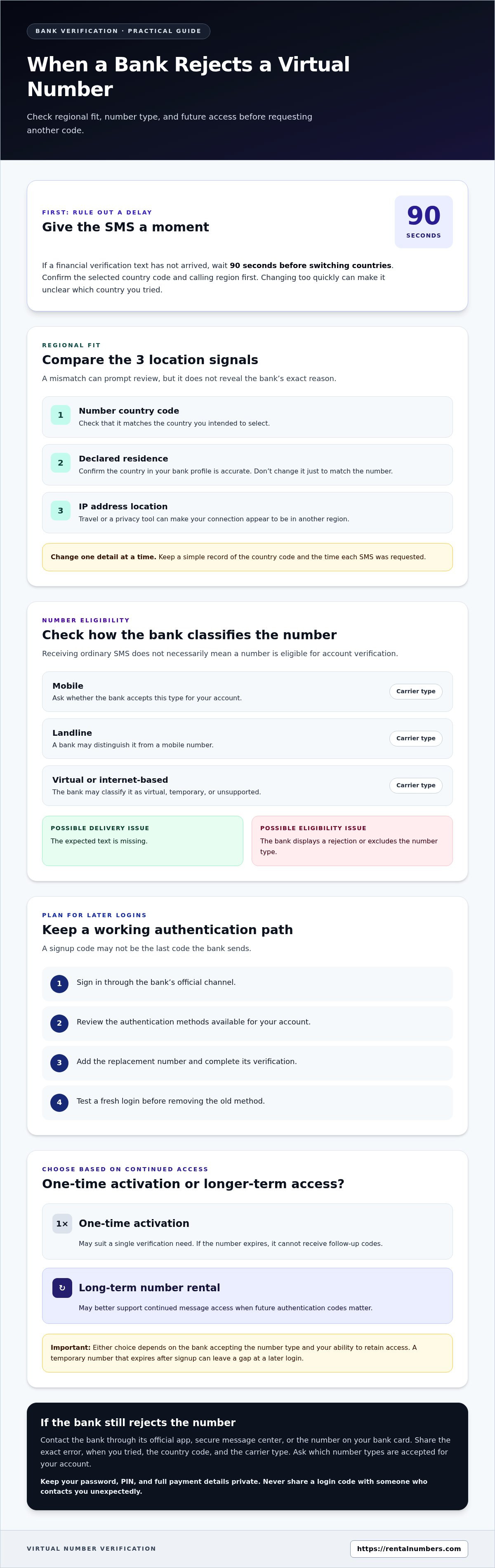
A bank can reject a virtual number when its country code, your IP address, and your declared country of residence do not align. If you’re deciding what to do if a bank rejects my virtual number, check those regional details and the number’s carrier type, then consider whether it can receive future login codes. If a financial verification SMS hasn’t arrived, wait 90 seconds before switching countries.
A rejection doesn’t automatically reveal what went wrong. Compare the number’s country and carrier information with the bank’s verification requirements, and avoid repeated attempts that could create further mismatches.
This guide shows you how to check regional fit, identify carrier-related issues, and plan for future two-factor authentication. You’ll also learn when a one-time activation may not suit a bank account and when a longer-term number rental may better support follow-up codes.
Key Takeaways
- Separate a delivery delay from a number-type rejection before changing your verification details.
- Check whether the number is classified as mobile, landline, or virtual, since carrier type can affect acceptance.
- Plan for future login codes: an expired activation number cannot receive follow-up messages.
- Choose a one-time activation for a single verification need, or consider a long-term rental when continued access matters.
Table of Contents
Country-code and regional consistency
Before requesting another code, compare the number’s country code, your IP address location, and your declared country of residence. A mismatch can prompt a review. For example, a number from one country may appear inconsistent if your bank profile lists another country and your connection appears to be elsewhere. This won’t reveal the bank’s exact reason, but it gives you a useful first check.
Start with the country selected for the number, then review the residence country in your bank profile. Check whether your current connection’s IP address points to another region. Travel or a privacy tool can make your IP location differ from your residence. Keep your details accurate, and don’t change your bank profile just to match the number.
If the financial verification SMS hasn’t arrived, wait 90 seconds before switching countries. Use that time to confirm the number’s country code and the bank’s selected calling region. Switching too quickly can leave you unsure which country you tried. Change one detail at a time, then request a new code only after checking the selected region.
- Check the country code: Match it against the country you intended to select.
- Review your bank profile: Confirm the declared country of residence is accurate.
- Assess your connection: Note whether your IP address appears tied to another region.
- Keep a simple record: Write down the country code and the time you requested each SMS.
Use this sequence to check for a regional mismatch before trying another number. If the number’s country code and your bank profile align but your IP points elsewhere, your connection may be the inconsistency. If all three align and the bank still rejects the number, regional fit may not be the issue. Next, check the carrier type and whether the number can receive future authentication codes.
Handling later two-factor authentication
If you can’t receive a bank code by text, use another method the bank offers. Check its sign-in screen or account settings for app approval, an authenticator option, or another recovery method. To decide what to do if a bank rejects your virtual number, first find out which alternatives your bank supports.
When changing authentication numbers, keep your current method active until the replacement works. Update the number through the bank’s official app or website, then test the new method before removing the old one. For example, complete a fresh login and confirm you can receive a code before relying on the replacement.
Banks may text access codes at login, so you need a way to receive codes after signup too. If a verification number expires, you may not be able to receive follow-up codes. Recovering access could then involve resubmitting identity documents, video verification, or a lengthy support process.
Plan the change before relying on a new number. Use this sequence:
- Sign in through the bank’s official channel.
- Review the authentication methods available for your account.
- Add the replacement number and complete its verification.
- Test a fresh login before removing the old method.
Keep your recovery details up to date, and store recovery codes securely if the bank provides them. Never share a login code with someone who contacts you unexpectedly. A code is for your sign-in, not for another person to use.
For an account that may need future SMS codes, a one-time activation may not fit. A long-term number rental can suit the need for continued message access. Choose this option only when the bank accepts the number type and you can retain access for later authentication. A temporary number that expires after signup can leave a gap at your next login. A clear plan for what to do if a bank rejects my virtual number also means choosing an authentication method you can access later.
Reasons banks reject virtual or temporary numbers
A bank may reject a number before sending a verification text because it classifies the number as virtual, temporary, or unsupported for account checks. That classification is separate from whether the number can receive ordinary SMS. For example, a code might reach the number, but the bank may still reject it during enrollment.
Carrier type can affect acceptance too. A bank’s system may distinguish mobile numbers from landlines or internet-based numbers. If the number is classified differently than expected, verification may stop. Separate delivery issues from eligibility issues: a missing text suggests a delivery problem, while an on-screen rejection may point to the number type or account policy.
A bank’s policy may require a mobile number for verification, but don’t assume every U.S. bank has the same rule. Ask which number types the bank accepts for your account.
Contact the bank through its official app or secure message center, or call the number on your bank card. Provide the exact error, when you tried, the number’s country code, and its carrier type. Keep your password, PIN, and full payment details private.
- Record the error: Copy the message shown during verification.
- Note the attempt: Provide the date and approximate time.
- Describe the number: State its country code and whether it is mobile, landline, or virtual.
- Ask for the rule: Find out which number types the bank accepts for your account.
Choose your next step based on the bank’s response. If it confirms that your number type is excluded, repeated code requests won’t change the policy. Ask about another available method, such as an authentication app or in-app approval. If the number type is accepted, share the error details so the bank can distinguish a delivery issue from an account restriction. Note the response for future logins or support requests.
Which types of phone numbers do U.S. banks accept for account verification?
U.S. banks set their own rules for verification numbers. A number’s ability to receive SMS doesn’t prove the bank accepts its type. During enrollment, a bank may distinguish mobile, landline, and internet-based numbers. Check the bank’s stated requirements before choosing a number.
A conventional mobile number may meet a bank’s mobile-number requirement. A landline generally can’t receive SMS in the same way. A virtual number may receive texts but still be classified differently by the bank. These categories describe how a number is delivered or classified, not whether a particular bank accepts it.
Check the account enrollment screen for permitted number types. Look for wording such as “mobile number” or “SMS verification.” If the screen rejects your number, note the exact error, then ask the bank whether the issue is the number’s classification, carrier, or account policy. Avoid repeated attempts with different numbers until you know the rule.
- Mobile number: Check whether the bank requires a mobile line for codes.
- Landline: Ask whether the bank offers a voice option instead of SMS.
- Virtual number: Ask whether its carrier classification is eligible.
- Alternative method: Review whether the bank offers app-based approval or another sign-in option.
Use the bank’s official app, website, or secure support channel to ask. Give the exact error and explain whether the number is mobile, landline, or virtual. Don’t send a PIN or login code in response to an unexpected message. Keep the bank’s answer with your account notes, especially if you may need codes for future sign-ins.
Choose a number based on the bank’s stated requirement and your need for continued access. If the bank requires a supported mobile number, a number outside that category won’t resolve the rejection. If the bank accepts the number’s classification, focus next on delivery and account settings.
RentalNumbers.com: One-time SMS Activation
RentalNumbers.com offers One-time SMS Activation for a single SMS verification. Use it only after confirming that the bank accepts the number type. If you may need later login codes, Long-term Number Rental is designed for continued access. A one-time activation number may expire, so it may not support future authentication.
Choose based on the bank’s number policy and your access needs. Wallet Credit Deposits let you add account credit, while the AI Assistant can help you use the platform. Neither changes a bank’s acceptance rules or replaces its account recovery methods.
Review the available options at RentalNumbers.com.
Make your next verification choice with account access in mind
Treat phone verification as part of your long-term account access plan, not just a signup step. Before choosing a number, consider how you’ll receive future codes and recover access if your authentication method changes. Focus on continuity, not just receiving one message. If you’re deciding what to do if a bank rejects your virtual number, let the bank’s stated requirements guide your next step.
Choose a verification option that fits the bank’s policy and your expected sign-in needs. If a virtual number suits those needs, explore the options at RentalNumbers.com. If the bank excludes that number type, use its alternative verification process instead.
Contact RentalNumbers.com for help with choosing an option for your verification needs. Make your next step deliberately, and keep your account access plan clear.
Frequently Asked Questions
What does a bank mean by a virtual phone number, and why might it reject one?
A virtual phone number handles calls or texts through an online service rather than a conventional mobile line. Banks may classify it differently from a carrier-issued mobile number during verification. A number might receive a signup code but fail a later account check. Treat enrollment and future login access as separate tests, and ask the bank which stage rejected the number.
How can I find out why my bank rejected my virtual number?
Ask the bank to identify the rejection category: number eligibility, code delivery, or an account security restriction. Use the secure support channel in its app or website, and have the error message and attempted action ready. For example, explain whether the rejection happened before a code was sent or after you entered it. That distinction can help support narrow down the issue.
Can I use a VoIP, Google Voice, or app-based number for bank verification?
Possibly, but acceptance depends on the bank’s rules for number types. VoIP, Google Voice, and other app-based numbers may be classified differently from mobile lines. Receiving a text doesn’t mean the bank will accept the number for verification. Check the requirements for your account before relying on one, especially if you’ll need the number for future logins or recovery.
What should I do if the bank rejects my number after I've switched carriers or ported it?
Check how the number is classified and whether the bank accepts that carrier type. Contact the bank through its official app or secure message center, or call the number on your bank card. Provide the exact error and the number’s carrier type.