
Skipping a phone number doesn’t automatically make an account anonymous. For online account setup without personal info, choose services that allow registration without a phone number, then check what email, recovery details, or identity checks they still require. Some services need an SMS-capable number, while an account with only a username and password may leave you without a way to recover it.
Wanting to share less information is practical, but each setup has tradeoffs. An email alias can separate registrations; a disposable inbox can offer temporary access; signing in through another account may share basic information and link your activity. This guide compares these options by phone requirements, recovery, privacy features, and identity verification. You’ll see what each can reduce, where it may limit account access, and how to choose a setup that fits the service. Use the comparison to decide before you register.
Key Takeaways
- Compare account phone requirements before registering, and weigh privacy against the risk of verification or access issues.
- Plan recovery options before choosing a username-and-password setup, so forgotten credentials don’t leave you locked out.
- Use email aliases and review sign-in permissions to reduce unwanted links between accounts and limit shared data.
- Separate basic registration details from identity checks, then choose an SMS option that fits the service’s requirements.
Table of Contents
Phone-number requirements and account tracking
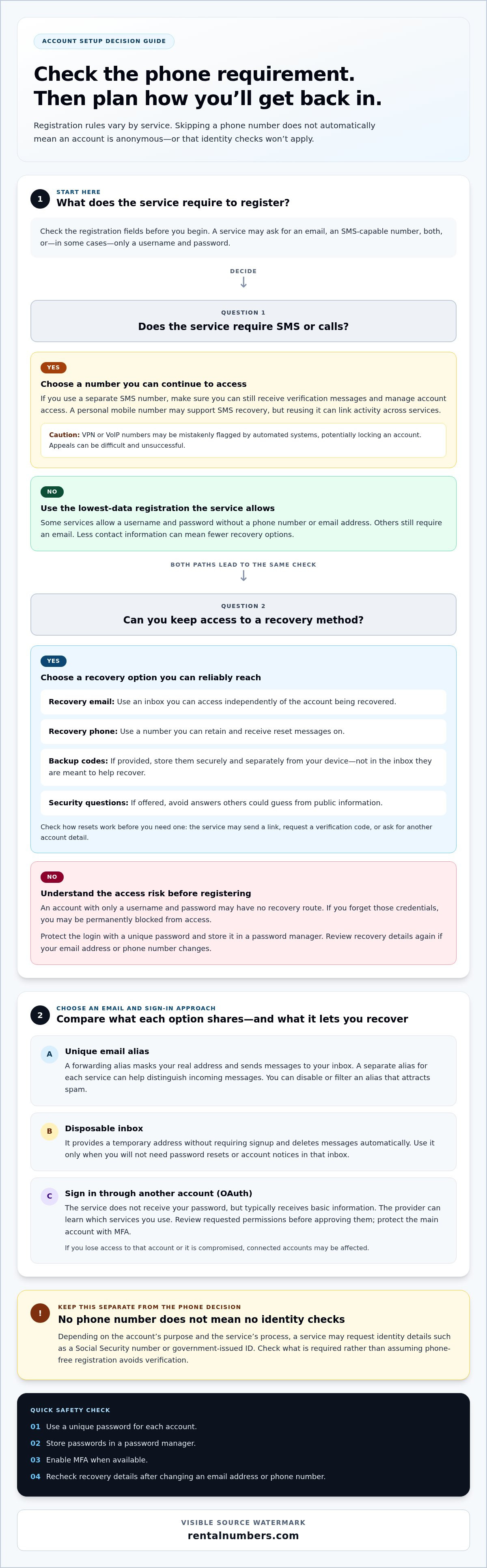
Yes. Some services let you sign up with a username and password, without a phone number or email address. Others require an email, an SMS-capable number, or both, so check the registration fields before you start.
A phone number can link activity across services, especially when you reuse it for registration and account recovery. Use a different number for each account only if the service supports it and you can still receive verification messages. Some services require SMS or calls to access an account or get help with an order, including international shopping.
Requirements vary. One service may ask only for an email, while another may request identity details such as a Social Security number or government-issued ID. These requests depend on the account’s purpose and the service’s process. Avoid assuming that skipping a phone number also means you can skip identity verification.
Automated systems may mistakenly flag VPN or VoIP numbers, potentially locking an account. Appeals can be difficult and unsuccessful. For password security, use a unique password for each account, store it in a password manager, and enable MFA when available.
| Option | Phone requirement | Recovery and privacy tradeoff |
|---|---|---|
| Username and password | May need no phone | Less contact data, but recovery may be limited |
| Personal mobile number | Uses your usual number | Can link accounts; may support SMS recovery |
| VoIP number | Uses an internet-based number | May trigger automated fraud checks |
| Separate SMS number | Uses a number apart from your personal line | Separates contact details; access depends on number availability |
Choose username-and-password registration when the service allows it and you can protect your recovery credentials. If phone verification is required, use a separate SMS number only when you can still manage account access, or explore options from Proxied to receive verification messages without exposing your personal line.
If you want to avoid sharing a phone number, choose a service that doesn’t require one for registration. Use a password manager and strong, unique passwords. VPN or VoIP use may lead to mistaken account locks.
Optional account recovery details
Recovery settings determine what happens if you lose a password or device. An account that accepts only a username and password may offer no recovery route if you forget those credentials. Before registering, check the account’s recovery settings or help page to see what reset methods are available. Don’t assume you can add them later.
A recovery email or phone number can restore access, but it also links another contact detail to the account. Use an address you control and can access independently. For example, don’t rely on an inbox you could lose along with the account you’re trying to recover. Consider whether the recovery benefit is worth sharing that detail.
- Recovery email: Choose an inbox you can access without relying on the account being recovered.
- Recovery phone: Use it only if you can retain access to that number and receive reset messages.
- Backup codes: Save codes securely if the service provides them, and keep them separate from your device.
- Security questions: If offered, avoid answers that others can guess from public information.
Review the reset process before you need it. Find out whether the service sends a link, requests a verification code, or asks for another account detail. Keep backup codes somewhere secure, such as a password manager or a protected offline record. Don’t store them in the inbox they’re meant to help you recover.
Review recovery details after changing an email address or phone number. Remove outdated contact methods where possible, then make sure you can still access your current recovery inbox. For a low-data setup, use the fewest recovery details that still provide a workable way back in. If you choose no recovery option, protect your login credentials carefully, as forgetting them may permanently block access.
Privacy features to look for
Before signing up, compare how each option handles your email address and linked accounts. A unique alias for each service can help you identify where a breach or unwanted marketing email originated. It also keeps the address you give one service separate from the address you use elsewhere.
A forwarding alias creates a masked address and sends messages to your real inbox. You can disable or filter an alias that attracts spam without changing your primary email. A disposable inbox works differently: it provides a temporary address without requiring signup and deletes messages automatically. Use one only when you won’t need password resets or account notices in that inbox.
- Unique email alias: Use a separate forwarding address for each service to distinguish incoming messages.
- Disposable inbox: Use it for a short-lived registration when you won’t need ongoing email access.
- OAuth sign-in: Review the permissions before linking an existing account.
OAuth sign-in doesn’t give the service your password, but it typically shares basic information. The OAuth provider can also learn which services you use. Review each permission request before approving it, especially if it lets an external service access or act on account data. Protect your main OAuth account with MFA. If you lose access to it or it’s compromised, connected accounts may be affected.
For more separation, some people use a username and password without an email address, alongside a VPN like VPN Secure or Tor. This can reduce identifying links, but it doesn’t erase information held by the service. User data can still be exposed through breaches, third-party disclosure, or unauthorized employee access. Some services also retain a history of account changes, even after information is overwritten.
Choose based on how long you need access. Use a forwarding alias for ongoing messages, a disposable inbox for temporary registration, and OAuth only when its permissions suit the task. Keep account details minimal and review linked-account access as it changes.
Personal information and identity verification
Identity checks vary by provider and account purpose. Keep public profile details separate from information requested for verification.
Username-Only Signups
Some email and messaging services allow signup with only a username, while others require an email address or phone number. Provider policies also differ on pseudonyms: a display name may be flexible even when identity or payment fields require accurate details. Look for separate username and legal-name fields before creating your profile.
There isn’t one set of personal details required for every online signup in the United States. The fields a provider requests depend on its service and purpose, while legal obligations also vary by jurisdiction. Don’t assume a Social Security number or ID is universally required. Check what the specific account asks for and distinguish optional profile details from fields needed for its function.
Username-only registration can reduce the contact details attached to an account, but it may leave fewer ways to prove ownership. If a service offers no recovery method, losing your username or password could block access. Use this setup only if you can store your credentials securely and accept the account’s recovery limits.
Risks of Fake Information and Temporary Email
Fake identity details can cause problems if a service later compares your signup information with documents or account records. A mismatch may interrupt verification or make it harder to regain access. Use a pseudonym for a public-facing username when permitted, but don’t enter false details in fields used for identity verification.
A temporary email address may expire or delete messages before you need a password reset. For example, if a service sends a recovery link to an inbox you can no longer open, you may lose access. Use temporary email only when you don’t need ongoing notices or account recovery. For accounts you plan to keep, choose an address you control.
Need a separate number for a service’s SMS verification step? Choose a number for account verification while keeping your personal line out of the signup flow.
RentalNumbers.com: One-time SMS Activation
RentalNumbers.com offers One-time SMS Activation for account signups that require phone verification. Use it when a service requests an SMS code and you prefer not to use your personal phone number. If you need a number for ongoing verification, Long-term Number Rental is another option.
Choose an option that matches the account’s verification needs. RentalNumbers.com provides temporary phone numbers for SMS verification services worldwide. Its dashboard lets you manage rentals, view SMS history, and track transactions. These options address phone-number verification, not services that require identity documents or other personal details. Review the account provider’s requirements before choosing a verification method.
Visit RentalNumbers.com to explore SMS verification options.
Make privacy part of your signup routine
Build a repeatable process for each new account. Before registering, decide what information the service needs, which contact details you’re comfortable sharing, and how you’ll protect access. This makes online account setup without personal info a deliberate choice rather than a last-minute workaround. Keep a separate record of the details you use so you can manage accounts without relying on memory.
For services that require SMS verification, RentalNumbers.com offers One-time SMS Activation and Long-term Number Rental. Wallet Credit Deposits are also available. Choose based on whether you need a one-time verification or continued access to a number.
Take the next step at your pace. Contact RentalNumbers.com about your options and select the setup that fits your account needs. A clear process helps you register with more control over the information you share.
Frequently Asked Questions
Which online services let users create accounts without providing personal information?
Some services let you register with a username and limited profile details, but requirements vary. Review the signup form and distinguish required fields from optional ones before entering information. For example, a discussion account may need a handle, while a payment or identity-sensitive service may ask for more details. Assess each service on its own; one provider’s signup rules don’t predict another’s.
What are the best privacy-focused services for anonymous account signup?
Prioritize services that collect only the information needed for their function and offer clear controls for profile visibility, data retention, and account deletion. Compare signup fields and privacy settings before registering. A pseudonymous handle offers limited separation if your profile reveals identifying details elsewhere. Avoid linking accounts by default, and choose services with privacy terms that fit how you plan to use them.
How can you create an online account while sharing the least personal information?
Identify required fields first, then leave optional profile details blank. Use a distinct username and, if an email is required, an alias you control. Decline address-book syncing and permissions unrelated to the account’s purpose. Review profile visibility before posting. Online account setup without personal info still depends on each service’s verification requirements, so provide accurate details wherever identity checks apply.
What information is legally required to create online accounts in the United States?
There is no single set of personal details required for every online account in the United States. Requirements depend on the provider, the account’s purpose, and applicable jurisdiction. A Social Security number or ID is not universally required.