
A one-time number isn’t always the simplest choice. If you expect more verification messages, a longer rental may fit better. When you rent virtual number for sms, match the access period to the task, then choose a country and service that fit the verification you need.
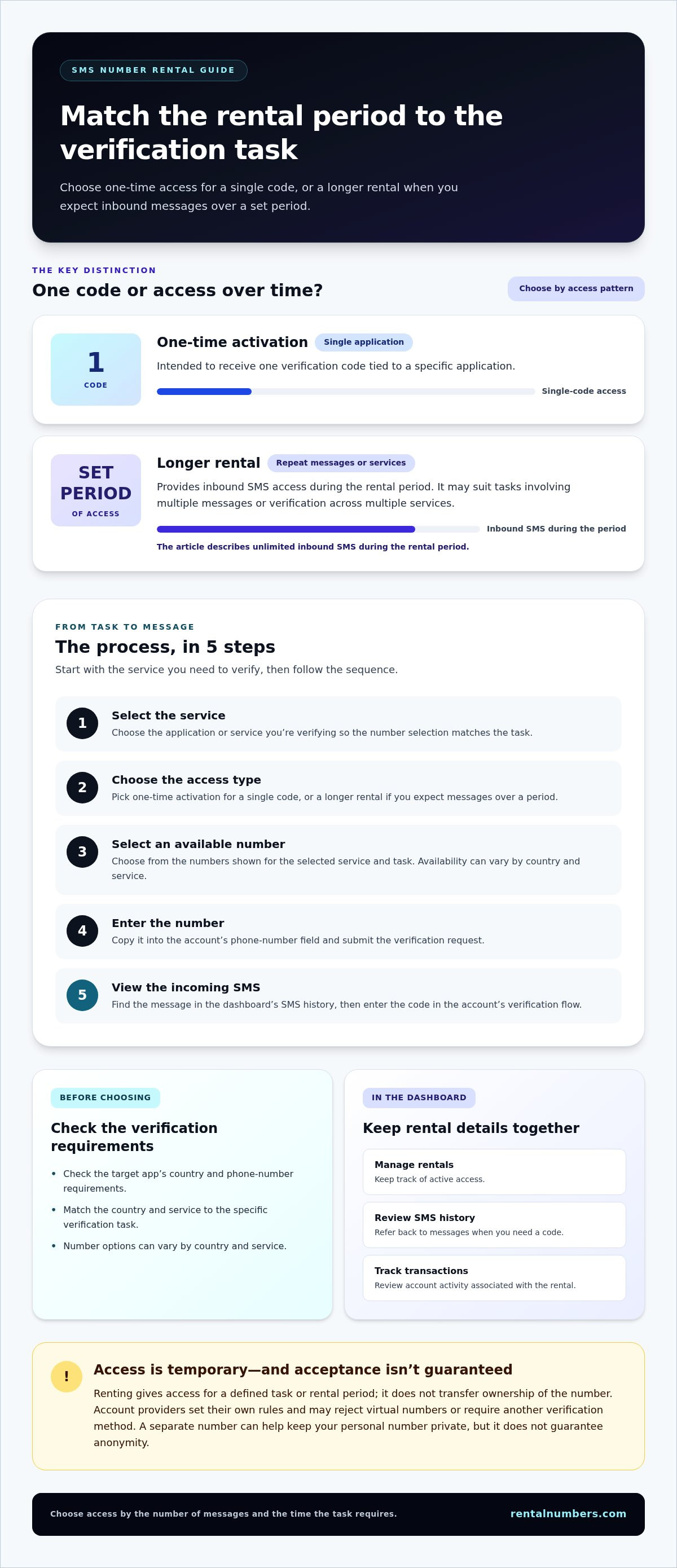
You may want to keep your personal number private, but the right rental option depends on how you’ll use it. One-time SMS activation is for receiving a single code for a specific application. A longer rental provides access to inbound SMS during a set period, which can suit tasks involving multiple messages or services.
This guide compares the two options and walks you through choosing a number. Match the country and service to your verification task, then use the dashboard to manage the rental, review SMS history, and track transactions.
Key Takeaways
- Choose one-time activation for a single app verification, or a longer rental when you expect multiple inbound messages during a set period.
- Before you rent virtual number for sms, check the target app’s country and phone-number requirements.
- Follow the steps in order: select the activation type, choose a country and service, then view the incoming SMS.
- Number options can vary by country and service, so match your selection to the specific verification task.
- Use the dashboard to manage rentals, review SMS history, and track transactions.
Table of Contents
What Does It Mean to Rent a Virtual Number for SMS?
Renting a virtual number for SMS means getting temporary access to a number that can receive text messages online. When you rent virtual number for sms verification, choose access based on the task: one-time activation for a single code, or a longer rental for inbound messages during a set period. You access the number online rather than inserting a physical SIM card into your device.
A virtual number can serve as a separate contact point for a verification message. For more background on the concept, see What is a Virtual Number? The key difference between the rental options is the access period. One-time activation is intended for one code tied to a specific application. A longer rental provides inbound SMS access for its rental period.
To see the basic process in action, watch this overview:
Temporary access is not permanent ownership. Renting a number gives you access for a defined verification task or rental period; it doesn’t transfer ownership of the number to you. Keep that distinction in mind before using a rented number to register or verify an account.
What happens when a service sends a verification code?
First, choose the application or service you need to verify and select a number for that task. Enter the number where the account asks for a phone number. If the service sends an SMS to it, the message appears in the rental service’s dashboard. Open the message there and enter the code in the account’s verification flow. The number is used to receive an inbound message, not to place calls or send texts.
Why use a rented number instead of a personal number?
A separate number can limit how often you share your personal number with online services. It provides a practical privacy layer for verification, especially if you prefer to keep sign-ups separate from your usual contact details. It doesn’t guarantee anonymity: the account provider may collect other information, and its data practices still apply.
Account providers set their own verification rules. A platform may reject some rented or virtual numbers, or require another verification method. A rental can help you keep your personal number separate, but it can’t ensure that a third-party service will accept the number or complete account verification.
Choose the access type based on what the task requires:
- One-time activation: suited to a single code for a specific application.
- Longer rental: suited to receiving inbound messages during a set period, such as a week- or month-length rental.
Once you know whether you need one code or ongoing access, you can follow the verification steps and manage the rental and message history in the dashboard.
How Renting a Virtual Number for SMS Works
Start with the verification task, not the number. Identify the app or service, choose the matching activation type, and enter the selected number in that account’s phone verification flow. One-time activation is for receiving one code for one application. A longer rental provides inbound SMS access during a set period.
- Select the service. Choose the application you’re verifying so you can match the number selection to the task.
- Choose the access type. Pick one-time activation for a single code, or a longer rental if you expect messages over a period.
- Select an available number. Choose from the numbers shown for the selected service and task.
- Enter the number. Copy it into the phone-number field on the account’s verification screen and submit it.
- View the incoming SMS. Open the dashboard, find the message in SMS history, and enter the code in the account’s verification flow.
Keep the account screen and dashboard easy to access while completing the steps. The account provider decides whether to accept the number and send a code. A rented number doesn’t guarantee verification or a particular account outcome. For general background on how rules can vary across jurisdictions, see DIDLogic’s Legality and Regulation of Virtual Numbers.
The steps for a one-time SMS activation
Select the application you need to verify, then choose an available number for that task. Enter the number in the account’s phone verification screen and submit the request. Check the dashboard for the incoming SMS. When the code appears, enter it in the account prompt to complete that verification step. One-time activation is focused on one code for one application.
What changes with a longer number rental?
A longer rental provides inbound SMS access for a set duration rather than focusing on a single activation. It can fit a task that may need more than one message or verification across multiple services during the rental period. The rental includes unlimited inbound SMS during that period. For this recurring-message use case, explore long-term number rentals.
The dashboard is the central place to manage rentals, review SMS history, and track transactions. Use the rental view to keep track of active access, then refer to message history when you need to find a code. Transaction tracking gives you a record of activity associated with your account, while the dashboard keeps rental and message information together.
Before you start, decide whether the task needs one code or inbound messages over time. Then select the corresponding activation type and follow the steps in order. To review SMS verification options, visit RentalNumbers.com.
One-Time SMS Activation or Longer Rental: Which Fits Your Needs?
Choose based on how many verification messages you expect and how long you need access. A single sign-up code usually calls for one-time SMS activation. If you expect repeat inbound messages or need to verify multiple services during a defined period, a longer rental may fit better. The deciding factor is your access pattern, not simply choosing the longest option.
| Factor | One-time SMS activation | Longer number rental |
|---|---|---|
| Use case | One verification for a specific application | Repeat messages or multiple services during the rental period |
| Access pattern | One code per activation | Inbound SMS access during a set period |
| Rental duration | Focused on a single activation | Set period, including week- or month-length rentals |
When is a one-time activation the practical choice?
Use one-time activation for a straightforward sign-up that asks for a single SMS code. The activation is charged per use and covers receipt of one code for one specific application. It’s a focused choice if you don’t expect to need that number for later messages. Don’t treat one activation as ongoing access. Choose a rental period if the task calls for repeated inbound SMS.
For example, if you’re creating one account and only need to complete its initial phone check, a single activation matches the task. If you expect a later login or another service to send a code, consider whether you’ll need continued access before choosing.
When does a longer rental make more sense?
Choose a longer rental when you expect repeat inbound messages during a defined period. It can also suit a workflow that involves multiple services within that rental window. Consider when the messages may arrive: if codes could come at different stages, a single activation may not provide the access pattern you need. Long-term number rentals provide inbound SMS access for a set duration.
To decide, ask yourself:
- Is this for one app and one verification code?
- Could you need another inbound message later?
- Will you use the number for more than one service during the rental period?
If the first answer is yes and the others are no, one-time activation is the focused option. If you need repeat access, consider a longer rental. Either choice depends on the task, and neither guarantees that a third-party app will accept the number. Compare the available number options against your verification needs.
How to Choose a Country and Service for SMS Verification
Start with the target app’s requirements. If it specifies a country or number format, use that as your first filter. Then choose a number listed for that country and the service you need to verify. Options can vary by country and service, so don’t assume a number offered for one app or region will also work for another.
Use this checklist before selecting a number:
- Check the account requirements. Look for instructions about supported countries, number formats, or accepted number types.
- Match the service. Select the app you’re verifying so the available number options align with that task.
- Choose the country. Follow the app’s stated requirements rather than choosing a country based on a general assumption.
- Consider future access. Decide whether you may need SMS for account recovery or later verification before choosing temporary access.
Match the number choice to the account's verification rules
Check whether the service says it accepts virtual or non-mobile numbers. Acceptance can differ by platform, account, and verification policy, and those rules may change. Matching the country alone doesn’t guarantee success. Select a number based on the app’s stated requirements, while keeping in mind that the account provider decides whether to accept it and send a code.
If the requirements aren’t clear, don’t treat a rented number as a guaranteed route to registration. Use it for a verification task that fits the provider’s rules. The SMS number selection workflow is straightforward: choose the service and number, enter the number in the account prompt, then view the incoming message through the dashboard.
Consider privacy and future account access
A separate number can help limit where you share your personal number. But temporary access may not suit an account that could need a later recovery code. Before you register, consider what happens if you lose access to the account and the provider sends another SMS in the future. A rented number is a verification tool, not a permanent identity or phone line.
For a one-time sign-up, temporary access may fit if the account won’t depend on that number later. For a critical account, review its recovery options first and consider whether you can maintain access through another method. This trade-off matters: keeping your personal number separate may reduce exposure, but you still need a reliable way to regain account access.
Once you’ve checked the app’s country and number rules, match your selection to the service and your future access needs. If you’re ready to choose a number for a verification task, select an SMS verification number.
Rent a Virtual Number for SMS Through RentalNumbers.com
Match number access to your verification task with a simple sequence: identify the app, choose one-time activation or a longer rental, select a country and service, then manage the rental and incoming messages in the dashboard. If you plan to rent virtual number for sms verification, begin with the account’s requirements and the number of messages you expect to receive.
Prepare before starting your rental
Identify the app or website that needs verification. Review its number acceptance and account recovery requirements before selecting a number. Then decide whether you need one code for one application or inbound messages during a rental period. This helps you choose access that fits the task without overlooking possible future recovery needs.
Keep these details in mind:
- App or website: Know which service will send the verification SMS.
- Country requirements: Follow the target service’s stated country or number-format rules.
- Access period: Choose one-time activation for a single code, or a longer rental if you expect messages over time.
- Account recovery: Consider whether you’ll need access to the number later to recover the account.
Complete the rental and manage the SMS
Select the activation type that fits the task, then choose the country and service from the available options. Follow the on-screen flow to select the number and enter it in the account’s verification prompt. If the service sends a code, check the dashboard for the incoming SMS and enter it on the account screen. The dashboard also lets you manage rentals, review SMS history, and track transactions.
The workflow is for receiving inbound SMS verification. It doesn’t provide calls or outbound texting. Matching a number to an app’s requirements can guide your choice, but the app decides whether to accept it. A rental can’t guarantee registration or verification.
Fees can vary by country and application, so review the relevant SMS number pricing information as you compare options. Focus on the task, access period, and target service before proceeding. Choose one-time activation for a single application and code, or a longer rental if you expect multiple inbound messages during a set period.
Ready to match an option to your verification task? Choose a number for SMS verification.
Set Up Your Next Verification Task
Make the next step deliberate. Before you rent virtual number for sms, decide what the account needs now and whether you may need the same number for recovery later. That choice helps you select access that fits the task without adding steps you don’t need.
RentalNumbers.com provides temporary numbers for SMS verification worldwide. Use the dashboard to manage rentals, review SMS history, and track transactions while you complete the verification process.
Keep the target service’s requirements in view as you select a number. Matching the app, country, and access period gives you a practical starting point, while the account provider remains responsible for its own verification decisions.
Ready to put your selection into action? Choose a number for SMS verification and move forward with the option that fits your task.
Frequently Asked Questions
Can every website accept a rented virtual number for SMS verification?
No. Each website sets its own verification rules, and acceptance can vary by platform, account, and number type. A number that works for one sign-up may not be accepted for another. Review the service’s help page or verification screen for restrictions before starting. If the site rejects the number, use a verification method it accepts rather than assuming another country or number will work.
Can I use a rented number to send SMS messages or make calls?
No. RentalNumbers.com’s temporary numbers are for receiving inbound SMS, such as verification codes. They aren’t for making calls or sending outbound texts. For example, you can use an incoming code to complete a sign-up, but you can’t use the number to text a contact or call a support line. Choose a service designed for those functions if your task requires calls or outgoing messages.
Do I own the virtual number after the rental ends?
No. Renting gives you temporary access, not permanent ownership. Once the rental period ends, don’t rely on being able to receive future messages at that number. For example, a later password reset code may not reach you through an expired rental. Treat the number as access for the selected verification task or rental period, not as a permanent contact detail.
Is a rented number suitable for an account I may need to recover later?
It may not be the best choice if account recovery depends on receiving a future SMS at the same number. Before signing up, review the account’s recovery settings and add another recovery method if the service allows it. For an important account, consider whether you can regain access without that number. Temporary access can separate a sign-up from your personal number, but it doesn’t provide lasting recovery access.
How much does it cost to rent a virtual number for SMS?
The fee depends on the option you select. One-time activation is charged per activation for a code tied to one application. Longer rentals are charged for access during a set period. Fees can vary by country and by the application being verified, so review the current SMS verification pricing for your selection before proceeding. Don’t assume one rate applies to every country or service.
Can I use the same rented number for more than one service?
A longer rental can support inbound SMS for multiple services during its rental period. For example, you might use it to verify more than one account while access remains active. One-time activation is different: it covers a single code for a specific application, so don’t treat it as multi-service access. Check each target service’s number rules before using the rented number for another account.
Can I receive SMS on a rented number while travelling?
You can view incoming messages through the online dashboard if you can access your account and the rental is active. For example, while travelling, use an internet-connected device to check SMS history for a code. Your physical location doesn’t change the target service’s verification rules, and you can view a message only if it’s sent to the rented number. Keep your account sign-in details secure while accessing the dashboard away from home.