
A Google Voice alternative for SMS verification may be a better fit when you need a code but not a permanent second number. If a service rejects Google Voice, the next step is to choose a number you can access and that the platform accepts. The right option depends on whether you need one text or access to future messages.
It’s easy to focus on getting past the verification screen. But acceptance varies by platform, and a temporary number may not work for every account. Consider what happens if the service asks you to verify again or recover access later.
This guide compares alternatives by verification needs, privacy, and ongoing access. You’ll learn when one-time SMS activation can fit a single eligible code, when a long-term rental may suit repeat inbound messages, and when another number type may make more sense. Use the comparison to match the number to the account, understand its limits, and avoid choosing an access period that’s too short.
Key Takeaways
- Choose a google voice alternative for sms verification based on whether you need one code or repeat access to inbound messages.
- Compare carrier numbers, ongoing virtual numbers, and one-time activations by access duration, privacy needs, and account use.
- Temporary and virtual numbers can be rejected. Acceptance varies by platform, country, and current service rules.
- Identify the app, choose the access period, select an available number, then retrieve the SMS. Use it only for accounts you control and follow the platform’s rules.
- Match the verification task to the number format. RentalNumbers.com offers one-time activation for a single eligible code and long-term rentals for repeat inbound SMS, with rental management and SMS history in the dashboard.
Table of Contents
- Why Seek a Google Voice Alternative for SMS Verification?
- Which Google Voice Alternative Fits Your SMS Verification Needs?
- Will a Google Voice Alternative Work? Check Acceptance, Privacy, and Account Access
- How to Use an SMS Verification Alternative Without Losing Track of Access
- Choose RentalNumbers.com for One-Time or Ongoing SMS Verification
Why Seek a Google Voice Alternative for SMS Verification?
An SMS verification alternative is a phone number or service used to receive a platform’s one-time code by text. It solves a narrower problem than replacing Google Voice. You may need one code to finish a signup, not calls, voicemail, or an ongoing second line.
That distinction matters. Google Voice is designed for broader phone use, while SMS verification comes down to whether a specific platform will send a code to a number you can access. A google voice alternative for sms verification could be a mobile carrier number, an ongoing virtual number, or a one-time activation. The best fit depends on the account and whether you’ll need the number again.
Common reasons to look elsewhere include a platform rejecting the number type, Google Voice not being eligible where you are, a preference to keep your personal number private, or a need for repeat access to future codes. An OTP is intended for a specific authentication step. Learn more about One-time password (OTP) and SMS verification, including security considerations. Receiving a code doesn’t mean a number will work for every platform or account.
Why might Google Voice not work for a verification code?
Each platform sets its own rules for number types and account verification. It may accept some carrier numbers but reject certain virtual or internet-based numbers. Rules can also vary by country or change over time, so review the target platform’s current requirements and Google Voice’s availability for your location.
Separate eligibility from delivery. A message saying a number can’t be used points to a platform rule. If the number is accepted but the code doesn’t arrive, the issue may be with delivery instead. These problems call for different next steps. Don’t assume a delay means the number type is rejected, or that another number will necessarily be accepted.
What does the user actually need: one code or a second line?
Start with the account’s future access needs. If you’re completing a single signup and don’t expect later SMS checks, a one-time verification option may fit. If the account may request codes again for sign-in, security changes, or recovery, you’ll need ongoing access to the number. Losing access can make account recovery harder.
That doesn’t always mean you need a full second-line service. Match the access period to the account’s likely use, then consider how you’ll retrieve future messages. A virtual number can provide SMS access, but it isn’t automatically a substitute for calls, voicemail, or permanent number ownership. The available SMS verification numbers support the one-code use case, while a long-term rental is designed for repeat inbound SMS. A virtual phone number is accessed through an online service rather than a standard personal mobile line, and its features depend on the service and intended use.
Which Google Voice Alternative Fits Your SMS Verification Needs?
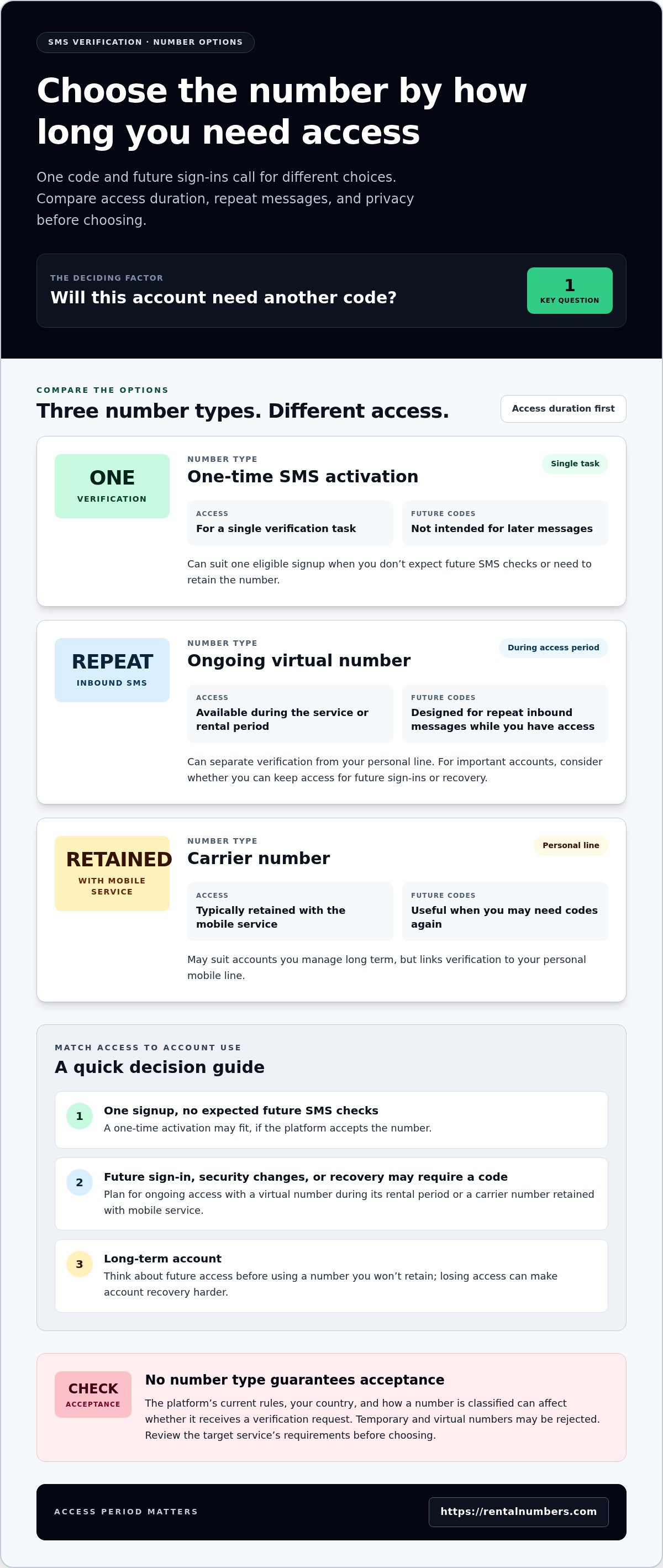
Choose by access duration first. A one-time signup and an account you expect to use long term have different SMS needs. The table compares common options by how long you can access the number, whether you may need repeat messages, and the privacy trade-offs to consider.
| Number type | Access duration | Repeat inbound SMS | Privacy preference and account use |
|---|---|---|---|
| Carrier number | Typically retained with the mobile service | Useful when future codes may be needed | Links verification to your personal mobile line; may suit accounts you manage long term |
| Ongoing virtual number | Available during the service or rental period | Designed for repeat inbound messages during access | Can separate verification from your personal line; consider continued access for important accounts |
| One-time SMS activation | For a single verification task | Not intended for future codes | Can suit a single eligible signup when you don’t need to retain the number |
No number type guarantees acceptance. The platform’s current rules, your country, and how a number is classified can affect whether it receives a verification request. Review the target service’s requirements before choosing. For a temporary account, one-time access may match the task. For a long-term account, plan for future sign-ins and recovery before using a number you won’t retain.
When is a one-time SMS activation the right alternative?
Use this format when you need one code for one application and don’t expect to keep the number for later messages. One-time SMS activation is intended to receive a single code for a specific application. Browse the available verification numbers for this type of task, remembering that the platform decides which numbers it accepts.
When should you retain access to a number?
Choose ongoing access if the account may request another code for sign-in, security changes, or recovery. A one-time activation isn’t designed for future access. A long-term rental supports inbound SMS during its rental period, but it isn’t permanent number ownership. Explore long-term number rentals when repeat messages matter.
The practical choice for a google voice alternative for sms verification is the shortest access period that still covers the account’s likely needs. For an eligible verification, RentalNumbers.com SMS verification options include one-time activation and ongoing rentals.
Will a Google Voice Alternative Work? Check Acceptance, Privacy, and Account Access
It may work, but no temporary or virtual number is accepted by every platform. Each service sets its own verification controls. Rules can differ by country, account type, and number classification, and platforms can change their policies. Treat a google voice alternative for sms verification as an option to assess against the target service’s current requirements, not as a guaranteed workaround.
Review the platform’s help information before starting. Look for instructions about supported phone numbers or verification methods. If the service says it doesn’t support a number type, that’s an eligibility decision, not necessarily a delivery problem. If the number is accepted but no code arrives, the issue may instead involve delivery, the number’s availability, or the platform’s process. Don’t assume repeating a request will resolve either issue.
Can platforms reject virtual or temporary numbers?
Yes. Platforms control which numbers they accept and may use checks to distinguish number types. A number that works for one service may be rejected by another. Country can matter too. Review current rules for the specific account and location, and use only verification methods the platform permits. Neither a virtual number nor a carrier number guarantees acceptance or code receipt.
Does a different number make verification more secure?
A separate number can help keep your personal phone number private during an eligible signup. Privacy and account security are different, though. Changing numbers doesn’t protect an account from every threat, and SMS codes can have weaknesses, including risks tied to number takeover or interception. Use a strong, unique password and enable a stronger authentication method, such as an authenticator app or passkey, if the platform offers one. Treat verification codes as private credentials. Don’t share them with anyone.
Also consider who can access incoming messages. A number used for verification may expose codes to whoever controls that number during the relevant access period. Use it only for an account you control, and follow the platform’s rules. Don’t put sensitive recovery access on a number you cannot reliably reach.
Which accounts should keep a stable recovery number?
Plan carefully for financial accounts, work accounts, and your primary email. These accounts may be important for identity checks or account recovery. If a code is requested later and you no longer have access to the number, recovery may become difficult. A one-time number is a poor fit when future codes could be essential.
Before verifying, review the account’s recovery settings. Add a recovery method you can access over time, such as a retained phone number, backup codes, or another method supported by the service. Keep that information secure and current. For a secondary account with no expected future SMS checks, a single-use option may be more suitable. For an account you depend on, prioritize continuity over short-term convenience.
How to Use an SMS Verification Alternative Without Losing Track of Access
Keep the verification process simple, but plan for access before requesting a code. First identify the app and review its current verification rules. Then choose a number format that matches how long you’ll need to receive SMS. Use the number only for an account you control, and follow the platform’s terms. A google voice alternative for sms verification is useful only if it fits both the verification step and your future access needs.
- Identify the app. Check which verification methods and number types the platform permits. Don’t assume a number accepted by one service will work for another.
- Choose the access duration. Use one-time activation for a single eligible code. Choose ongoing access if you may need later messages.
- Select an available number. Match the app and number options shown to the verification task. Review your selection before submitting it to the platform.
- Request and retrieve the SMS. Enter the number on the platform’s official screen, then check the activation or rental information for the message. The SMS activation process follows this basic sequence.
What should you do before requesting a verification code?
Confirm the account’s requirements first. Decide whether one code is enough or whether future sign-ins and recovery may require the same number. Don’t start a one-time verification if you expect to need that number later. Enter the number carefully, and request a code only when you’re ready to retrieve it. Repeated requests may trigger platform rate limits or extra security checks.
Use the platform’s approved verification flow. A number is for receiving SMS, not for bypassing account controls or creating access to someone else’s account. If you’re setting up an account that matters long term, review its recovery options before beginning so you know what will remain available after verification.
What should you do after receiving the code?
Enter the code only on the platform’s official verification screen. Don’t share a one-time password with another person or paste it into an unrelated website. After the platform accepts the code, note the recovery methods available on the account. If you’re using a temporary number, save any backup codes or set another supported recovery method before your access to that number ends.
If no code arrives, pause before requesting another. Check the number and application details, the displayed activation or rental status, and the platform’s instructions. Confirm that the target service permits that number type. Avoid repeated retries if the platform shows a limit or security warning. A rejected number points to an acceptance rule; a missing message after the number is accepted may call for a different troubleshooting step. Neither outcome guarantees success with another number.
Ready to follow this workflow with a number suited to your verification task? Choose an SMS verification option based on whether you need one code or ongoing inbound access.
Choose RentalNumbers.com for One-Time or Ongoing SMS Verification
RentalNumbers.com offers two access formats for SMS verification. Use one-time activation when you need a single code for a specific application. Choose a long-term number rental when you expect repeat inbound messages during the rental period. This keeps the choice focused on the task rather than call, voicemail, or second-line features you may not need.
How does the service fit a one-time verification task?
One-time SMS activation is intended to receive a single SMS code for a specific application. Start by identifying the platform, then review the available service and number options for that verification task. The platform decides which number types it accepts. A temporary number can help separate a signup from your personal number, but it doesn’t make every part of account use anonymous.
Use the number only for an account you control. Before requesting a code, consider whether you might need the same number for future sign-ins or recovery. If so, a single-use activation may not match the account’s access needs. Follow the platform’s rules, and don’t treat an available number as a promise that verification will succeed.
How can users manage repeat SMS needs?
For accounts that may request later codes, a long-term rental provides inbound SMS access during the rental period. It can suit repeat verification needs without implying permanent number ownership or outbound voice calling. Keep the access period in mind when setting up recovery methods. If account access must continue beyond the rental, add another recovery option supported by the platform.
The dashboard helps customers manage rentals, review SMS history, and track transactions. Use these records to keep track of the rental and messages related to the verification task. RentalNumbers.com focuses on receiving SMS, not making calls or sending outbound texts. Platform acceptance still varies, so review the target service’s current rules before you begin.
For a practical google voice alternative for sms verification, match the format to the account: one-time activation for a single eligible code, or a rental when repeat inbound SMS access matters. Choose based on the app and the access period you need.
Choose an SMS verification option for your verification task.
Make Your Next Verification Choice Deliberate
Before starting another signup, decide what you need the number to do after the first code arrives. A convenient verification is useful only if it fits the account’s full lifecycle. For a low-stakes account, minimal access may be enough. For an account you rely on, review its recovery settings and preserve a method you can use later.
That check can prevent a temporary privacy choice from becoming an access problem. Keep your verification method aligned with the platform’s rules, your privacy preference, and the account’s importance. The right google voice alternative for sms verification depends on those needs, not just on getting through the signup screen. Decide before entering a number, while you can still choose an access period that fits.
RentalNumbers.com lets you select an SMS option for the task and manage related rental records through the dashboard. Start with the account’s needs, then choose an SMS verification option that fits. Take the next step with a clear plan for verification and future account access.
Frequently Asked Questions
Can I use a temporary number instead of Google Voice for SMS verification?
Yes, if the platform accepts that number type and sends its code to it. A temporary number may suit a one-off signup, such as creating an account you don’t expect to use for sensitive transactions. Before entering it, review the platform’s rules and consider future sign-ins. If you may need the number for account recovery, a temporary option could leave you without a useful recovery route later.
Why does a website reject my Google Voice number for verification?
A website may classify the number as virtual and block it under its own verification policy. The rejection can also relate to the account, country, or number history. Read the exact error message: “unsupported number” suggests an eligibility rule, while an accepted number with no incoming text suggests a different issue. Avoid cycling through numbers quickly, since repeated attempts may prompt additional security checks.
Can Google Voice receive verification codes outside the United States?
It depends on the country and the current Google Voice service and verification rules. Accessing Google Voice while abroad isn’t necessarily the same as being eligible to register or verify an account from that country. Review Google’s current country-specific information and the target platform’s SMS rules before relying on it. Don’t assume a code will arrive simply because the app or account is accessible from your location.
Is a one-time SMS number suitable for account recovery?
Usually not if you may need that number to recover the account later. For example, if a service sends a future security check to the number used at signup, a one-time number you can no longer access won’t help. Before choosing single-use access, set up another recovery method supported by the platform, such as backup codes or an authenticator. Keep recovery details secure and available offline if appropriate.
What should I do if a verification code does not arrive?
First, check that you entered the number correctly and that the service shows the request as active. Follow the platform’s stated wait time and troubleshooting instructions before requesting another code. If the number was accepted but no message appears, review the SMS status or history available to you. If the platform says the number type isn’t allowed, repeated requests won’t change that rule; use a permitted verification method instead.
Is it safe to use a virtual number for SMS verification?
It can help keep your personal number separate, but it doesn’t guarantee anonymity or protect the account by itself. Consider who can access incoming messages and how the number service handles account and message data. Use virtual numbers only for accounts you control, keep verification codes private, and secure the account with a strong password and any stronger authentication method the platform offers. Avoid using SMS as your only safeguard for high-impact accounts.
What is the difference between one-time SMS activation and a long-term number rental?
One-time activation is for receiving a single code tied to a specific application. A long-term rental provides inbound SMS access while the rental is active, which can suit accounts that may request another code. Neither option means permanent ownership of the number. Choose based on whether you need one verification message or expect to receive future texts, and review the platform’s acceptance rules before starting.