
What if a failed SMS 2FA test points to a delayed message, not broken authentication logic? Code delivery, expiration, and test setup can all affect the result. Reliable qa testing for sms-based 2fa separates these failure points instead of relying on manual code retrieval or real user accounts.
It’s reasonable to expect an automated test to cover the full sign-in flow. But access to verification codes can be inconsistent, and using real phone numbers or accounts can expose sensitive data. Build repeatable tests with controlled test data, clear failure signals, and security checks that don’t depend on fragile workarounds.
This guide explains how to test code delivery separately from code validation, cover expired and incorrect codes, and protect test environments. It also covers where temporary numbers fit in permitted real-message verification scenarios, and why receiving an SMS alone doesn’t automate or validate the full 2FA flow.
Key Takeaways
- Map the full verification flow into checkpoints so you can diagnose failures in delivery, code validation, and session creation.
- Use qa testing for sms-based 2fa to choose between mocked messages, provider sandboxes, and real SMS based on what each test must prove.
- Cover successful login, invalid and expired codes, delivery delays, and security controls with clear expected results.
- Keep fast mocked checks separate from slower end-to-end delivery tests to improve repeatability and isolate failures.
- Use temporary numbers only for permitted real-message scenarios, and treat receiving a text as one part of testing, not proof that the full 2FA flow works.
Table of Contents
What QA Testing for SMS-Based 2FA Needs to Prove
qa testing for sms-based 2fa must verify two separate things: that the verification code reaches the intended test destination, and that the application makes the correct access decision after code submission. Treat these as distinct test objectives. A received text is evidence of delivery, not proof that the account was authenticated correctly or that a secure session was created.
Definition: SMS delivery testing checks whether a message reaches its intended destination. End-to-end 2FA testing checks the full chain, from password acceptance and code request through code validation and the final access decision.
Make each stage observable. Record safe, non-sensitive test signals, such as event status and a correlation ID. Never log the full code or other secrets.
- Password accepted: Confirm that the designated test account passes the first authentication step.
- Code requested: Verify that the application starts a challenge for the account and login session.
- SMS received: Confirm that the message reaches the intended test destination. Delivery alone isn’t a pass for the full flow.
- Code submitted: Check that the entered code is associated with the active challenge, account, and session.
- Access decided: Verify that a valid code leads to the expected authenticated state, while an invalid or missing code does not grant access.
Which parts of the SMS 2FA flow should QA cover?
Test the checkpoints as connected events, not as isolated screens. For example, request a code for a designated test account, then verify that the received code is accepted only in the session that requested it. This catches mismatches that a basic “text arrived” check misses. Also test submitting a wrong code and submitting no code. Both should leave protected content inaccessible.
Capture a useful failure signal for each stage. A missing delivery event points to a different issue than a rejected valid code. If code verification succeeds but no authenticated session follows, the problem is likely after validation. State the expected outcome for every step so a failure points to the behavior that needs investigation.
How is SMS 2FA different from app-based MFA?
SMS testing includes an external message-delivery dependency. The application generates or requests a code, but delivery can be affected outside the application’s authentication logic. A delayed or absent text should not automatically be reported as a code-validation defect. Separate delivery checks from application checks to identify the failing layer.
SMS one-time passwords arrive through text messages. Time-based one-time passwords, commonly used by authenticator apps, are generated from a shared secret and a changing time window. Their test setups differ: SMS tests must account for message delivery, while app-code tests focus on code generation and acceptance. The Two-factor authentication (2FA) overview explains the broader model. Keep this scope focused on the SMS path and the application’s decision to grant or deny access.
How an SMS 2FA Test Moves from Code Request to Login
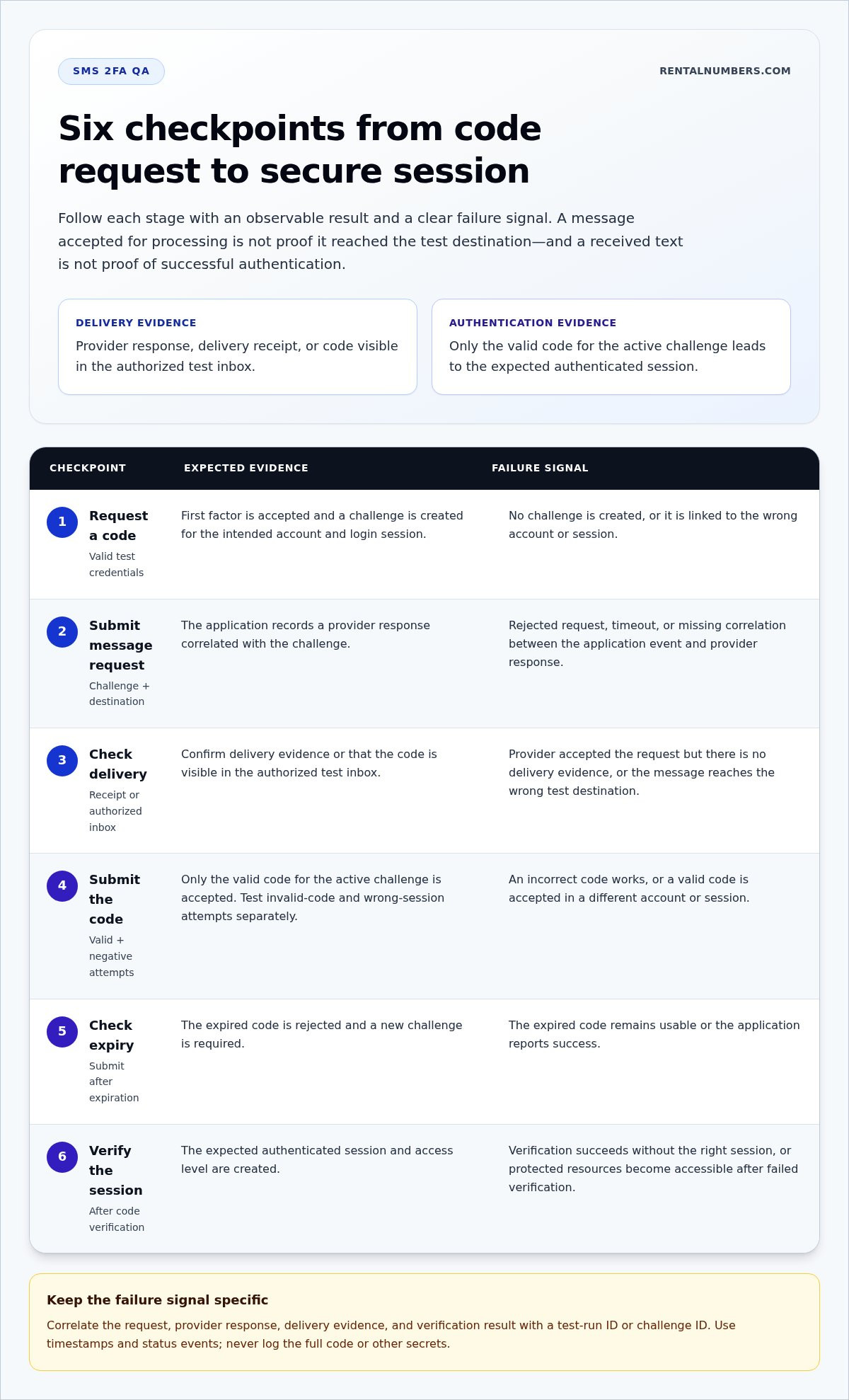
Trace a test transaction from the first request to the final access decision. Give each stage a defined input, an observable result, and a failure signal. This makes it easier to distinguish an application defect from a delivery issue. A provider’s acceptance response means the message was accepted for processing. It doesn’t prove that the SMS reached a handset or test inbox.
- Request a code. Input: valid test credentials and a request to start 2FA. Observe: the application accepts the first factor and creates a challenge for the intended account. Failure signal: no challenge is created, or it’s linked to the wrong account or session.
- Submit the message request. Input: the challenge and destination passed to the SMS provider. Observe: the application records a provider response tied to the challenge. Failure signal: a rejected request, timeout, or missing correlation between the application event and provider response.
- Check delivery. Input: the accepted message request. Observe: a delivery receipt or a code visible in the authorized test inbox, depending on the test method. Failure signal: a provider acceptance with no delivery evidence, or a message received at the wrong test destination. Don’t treat these outcomes as equivalent.
- Submit the code. Input: the received valid code, followed by separate invalid-code and wrong-session attempts. Observe: only the valid code for the active challenge is accepted. Failure signal: an incorrect code works, or a valid code is accepted in a different account or session.
- Check expiry. Input: a code submitted after the challenge expires. Observe: the application rejects it and requires a new challenge. Failure signal: the expired code remains usable or the application reports success.
- Verify the session. Input: a successfully verified challenge. Observe: the expected authenticated session and access level are created. Failure signal: verification succeeds without the right session, or protected resources become accessible after a failed verification.
What happens after the application requests an SMS code?
Correlate the request, provider response, delivery evidence, and verification result using a test-run ID or challenge ID. Use timestamps and status events to locate gaps, such as a provider response without a matching delivery event. Keep logs useful but sanitized. Don’t put full codes or personal phone numbers in shared test reports. Use masked destinations and non-sensitive identifiers instead.
How should QA validate code acceptance and session behavior?
Run valid, incorrect, expired, and wrong-session submissions as distinct cases. For the valid case, assert both code acceptance and the resulting session’s identity and access level. For every failed case, verify that protected resources remain inaccessible. These checks align with the broader NIST guidelines for authentication, which provide security guidance beyond message transport.
A successful 2FA test checks delivery and authorization separately, then confirms they connect to the same challenge and login session. For an authorized real-message scenario, a temporary number for SMS verification provides a test destination. Receiving a message supports the delivery check; the application’s verification and session behavior still need separate assertions. This distinction is central to reliable qa testing for sms-based 2fa.
Can SMS-Based 2FA Testing Be Reliable Without Weakening Security?
Yes. Reliability comes from matching each test method to the behavior it needs to prove, not from routing every automated test through a live phone number. Use mocks for application logic, provider sandboxes for integration behavior, and real SMS for checks that depend on actual message delivery. Keep the results separate so a simulated pass isn’t mistaken for proof that a live message arrived.
Each method has a different coverage and risk profile:
- Mocked messages: Fast, repeatable, and useful for checking code acceptance, rejection, expiry, and error handling. They don’t test the SMS provider or real delivery.
- Provider sandboxes: Useful for checking how the application connects to a provider and handles its responses. The behavior is controlled, so a sandbox result doesn’t establish that a message reached a real destination.
- Real SMS: Covers the live delivery path, but introduces external dependencies and less predictable timing. Limit it to tests that must verify actual delivery, and use only authorized test destinations.
When should QA mock SMS instead of sending a real message?
Mock the message layer for routine checks of authentication logic. For example, supply a controlled valid code, then test an incorrect or expired code without sending a text. Use a provider sandbox when the test must exercise the integration response. Reserve real-message checks for delivery behavior, such as confirming that a test destination receives the expected message. If using a temporary number for this purpose, first verify that the target platform permits that use.
Choose the narrowest method that proves the required behavior. Don’t make every pull request wait on an external delivery path. Keep a smaller set of real-message checks separate from fast automated tests, and report their results as delivery coverage, not as a substitute for application-level validation.
How can teams protect test accounts and verification codes?
Build a clear test boundary. Use isolated test accounts, non-production credentials, and restricted access to test environments. Keep real customer numbers and live account access out of routine automation. Don’t disable production 2FA to make a test pass. Test the intended control through an approved test setup instead.
- Restrict visibility: Mask destination numbers in reports and limit access to test inboxes and provider dashboards.
- Minimize secrets: Don’t write full codes or credentials to logs, screenshots, recordings, or shared test output.
- Limit retention: Remove sensitive test artifacts when they’re no longer needed, following your organization’s data-handling rules.
- Separate environments: Keep test credentials and configuration distinct from production access.
Check current guidance before treating SMS as suitable for a particular security requirement. NIST SP 800-63B-4, finalized July 31, 2025, classifies SMS and PSTN one-time passcodes as restricted authenticators. It requires organizations that use them to offer an unrestricted alternative, inform users of risks, apply risk mitigations, and maintain a migration plan. SMS isn’t permitted at AAL3. Use NIST authentication guidance as a starting point, then review the current standard for the applicable requirement. Strong qa testing for sms-based 2fa checks both test coverage and the safeguards around test data.
Which SMS 2FA Test Cases Catch the Most Common Failures?
Build a compact test matrix around four groups: normal flow, negative flow, delivery edge cases, and security controls. For every case, record the precondition, action, expected result, and diagnostic evidence. Define retry and resend behavior from the application’s configured rules. Don’t assume a universal threshold or lockout policy.
Which negative and edge cases should automated tests include?
Use mocks or a sandbox for predictable code-validation cases. Test delivery conditions through an environment that can represent them. Keep each failure isolated so the result points to a specific control, not an ambiguous end-to-end timeout.
- Normal flow: Precondition: an active test account and challenge. Action: submit the issued code. Expected result: verification succeeds and the intended access is granted. Evidence: challenge status, event timestamps, and session outcome.
- Incorrect or malformed code: Precondition: an active challenge. Action: submit a wrong value, invalid format, or empty input. Expected result: verification fails and protected access stays blocked. Evidence: validation result and sanitized error category.
- Expired or reused code: Precondition: an expired challenge or one already used successfully. Action: submit its code again. Expected result: the application rejects it. Evidence: challenge state and verification decision.
- Wrong-session submission: Precondition: separate test sessions with distinct challenges. Action: submit one session’s code in the other. Expected result: no cross-session authentication. Evidence: session and challenge identifiers, without code contents.
- Resend and retry limits: Precondition: configured limits for the test environment. Action: resend or submit failures until the relevant rule applies. Expected result: the application follows its configured response and prevents unauthorized continuation. Evidence: attempt counts and rate-limit status.
- Delivery edge case: Precondition: a test environment that can simulate delay, duplicate delivery, or provider failure. Action: trigger the condition. Expected result: the application handles the response without accepting an unverified challenge or confusing codes. Evidence: provider status, delivery events, and timestamps.
- Security controls: Precondition: a sanitized test account and logs. Action: inspect reports, recordings, and access after failed verification. Expected result: codes and personal data aren’t exposed, and protected resources remain inaccessible. Evidence: redacted artifacts and access-denial result.
How should QA diagnose a failed SMS 2FA test?
Locate the first missing or unexpected event: challenge creation, provider handoff, delivery evidence, code verification, or session creation. Compare timestamps and correlation identifiers across application and provider records. Mask message content and destination details in shared reports. A one-off delivery delay differs from a validation defect that repeats with the same controlled input.
For real-message cases, use an authorized test destination and verify the platform’s current rules first. Explore temporary numbers for SMS verification tests when a permitted scenario requires a real message. Receiving the text provides delivery evidence, not proof of the entire application test. A useful qa testing for sms-based 2fa matrix makes that distinction visible in every result.
How to Build a Repeatable SMS 2FA QA Workflow
Make each run answer a specific question. A repeatable workflow states what behavior is under test, which test path will prove it, and what evidence counts as a pass. Keep routine checks independent of live SMS delivery, then run a smaller end-to-end suite for the real-message path. This limits flaky dependencies without hiding delivery defects.
- Define coverage. List the behavior to verify, such as code validation, provider error handling, expiry, or successful session creation. Set the expected result and safe diagnostic evidence for each case.
- Select the test path. Use unit tests for code rules and authentication state changes. Use integration tests for provider requests and error responses. Reserve end-to-end checks for user-facing behavior and actual delivery.
- Prepare a controlled environment. Use isolated test accounts, non-production credentials, and approved test destinations. Keep production credentials and real customer numbers out of automated runs.
- Execute by test layer. Run fast mocked checks first, then provider integration tests, followed by the smaller real-delivery suite. Report each layer separately so a delivery delay doesn’t obscure a code-validation regression.
- Review and refine. Compare expected and observed outcomes. Use correlation identifiers and timestamps to locate failures, then update the test or application only after identifying the failing layer.
How should teams separate unit, integration, and end-to-end checks?
Unit tests should cover valid, invalid, expired, and reused codes, plus the application’s expected authentication state changes. Integration tests should exercise provider handoff and configured error handling without claiming a text reached a device. A smaller end-to-end suite should verify real delivery and user-facing behavior. Keep these suites independently reportable and use the same test-account boundaries across environments.
Set clear ownership for each signal. A unit failure points to application logic. An integration failure may involve request construction or provider response handling. An end-to-end failure can involve delivery or the full login path. Don’t retry a failing test until it passes and then discard the first result. Preserve the failure status and evidence so recurring issues remain visible.
Where can temporary numbers fit into a verification test?
Use temporary-number access only when the scenario genuinely requires receiving an external SMS. Check the target platform’s current rules and your team’s approved test policy before using one. Available SMS verification numbers provide a destination for a permitted real-message check, but they aren’t a QA sandbox and don’t automate the application’s full 2FA flow.
For a one-time activation scenario, the SMS verification process explains the number-access flow. Treat the received text as delivery evidence only. Your test must still verify code acceptance, rejection behavior, and the resulting session inside the application. Keep the real-message result separate from mocked and integration results in reports.
Finally, keep test artifacts lean. Store run identifiers and event outcomes, not full codes or unmasked personal data. With defined coverage, separated test layers, and a controlled review process, qa testing for sms-based 2fa becomes easier to repeat and diagnose without weakening production safeguards.
Make Your Next 2FA Test Easier to Trust
Use test results to improve the workflow, not just close a failed run. Keep a clear record of what each test proves, review recurring failure patterns, and update the test plan when authentication behavior changes. That discipline helps qa testing for sms-based 2fa stay useful as your application evolves, without turning every check into a live-delivery dependency.
For permitted scenarios that need a real verification message, RentalNumbers.com offers temporary numbers worldwide, with one-time activation and longer-term rental options. The dashboard provides access to SMS history and transaction tracking. These tools support the message-receipt step, while your own tests remain responsible for validating the application’s authentication flow.
Explore SMS verification numbers for a suitable real-message test scenario. Keep the test boundary clear, protect test data, and make each result easy to interpret. Build a repeatable process so your team can improve coverage with confidence.
Frequently Asked Questions
Can SMS-based 2FA be tested automatically?
Yes. Automate the application flow and assertions while controlling how the test receives its code. For CI, use a test fixture that supplies known inputs without exposing a real credential or customer account. Keep any mechanism that injects test codes confined to isolated, non-production environments. A separate, limited check can cover real delivery. This approach makes qa testing for sms-based 2fa repeatable without changing production authentication.
How do you test SMS OTP without a real phone?
Use a mock or a provider’s test environment when you need to test code handling or integration responses without a handset. For example, have a fixture return a known test code and assert that the application accepts it only for the intended challenge. If actual delivery matters, use a controlled destination through your approved process. Avoid public shared inboxes, which can expose codes to unrelated users.
What should an SMS 2FA test verify?
Verify that the challenge belongs to the correct account and login attempt, and that each code submission produces only its expected outcome. Include a check that starting a second login doesn’t accidentally make the first challenge valid in the wrong context. Confirm the resulting session exposes only the intended access. Treat a visible message as one piece of evidence, not a complete authentication result.
Why do SMS 2FA tests fail intermittently?
Intermittent failures often come from timing assumptions or test runs interfering with one another. A fixed sleep may be too short on one run and waste time on another. Prefer bounded waits for specific events, and give each run its own account state and correlation identifier. When a failure occurs, compare the same stage across runs before retrying. Automatic retries can hide a recurring defect.
Is it safe to use temporary phone numbers for QA testing?
It depends on the target platform’s rules and your organization’s approved test policy. A temporary number can receive an SMS for a controlled test, but it isn’t a substitute for an application sandbox or QA framework. Keep it out of production accounts and tests involving sensitive personal data. Don’t use temporary numbers to bypass a platform’s verification policies.
Should QA test SMS delivery or mock it?
Use both methods for different goals. Mocks are useful for repeatable checks of application decisions; delivery-focused tests can reveal problems that simulated messages cannot. For example, run mocked checks during routine code changes, then run a controlled end-to-end delivery check for a release candidate. Label results by test type so teams don’t mistake a mock pass for confirmation of live delivery.