A virtual number for fintech app verification has no single monthly price or cancellation rule. The rental type and service terms determine whether you pay per use or on an ongoing basis, and whether cancellation stops renewal or ends access immediately. Check the renewal and cancellation terms before relying on a number for account access.
Comparing fees and commitment terms first makes sense. The price depends on the case and is given after a quote request; rental duration, destination, and verification needs shape the cost. Free numbers may be released after inactivity, and after 3-5 failed SMS attempts, a bank account may be flagged for fraud review. This guide explains how monthly pricing and cancellation terms vary, what risks free numbers can bring, and which alternatives may suit one-time verification or longer-term access. Use the comparison to weigh ongoing access and account recovery, not just the initial signup.
Key Takeaways
- Read the renewal, cancellation, and access terms before selecting a rental. They determine when billing stops and whether you can still receive account messages afterward.
- Compare virtual numbers, physical SIMs, and VoIP apps by the verification method the fintech app accepts and the kind of access you need.
- Assess number reuse and account recovery before choosing a free option. A low-cost signup can create problems if you later need to receive another verification code.
- Estimate the full cost by considering rental duration and verification needs, then choose between one-time activation and longer-term access.
Table of Contents
Are there contracts or cancellation fees?
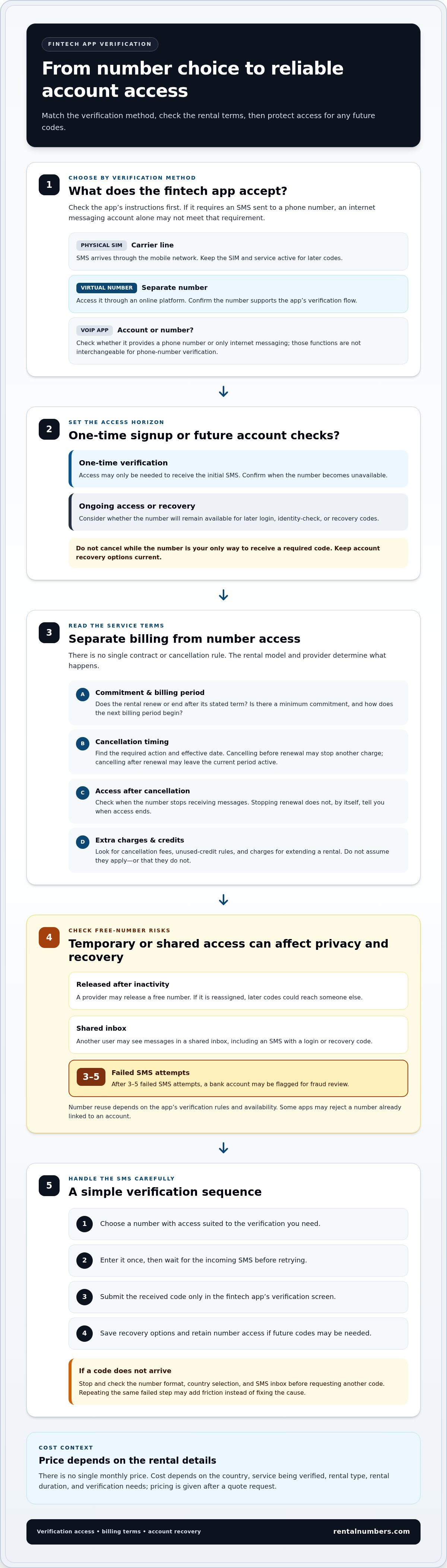
There is no single contract or cancellation rule for every virtual number. Terms depend on the rental model and provider. Compare three details before choosing: the billing period, the renewal rule, and what cancellation changes. A number used for a one-time fintech signup may require different access from one used for ongoing account recovery.
Read the service terms in this order:
- Commitment: Identify whether the rental renews or ends after its stated term. Look for any minimum commitment and how the next billing period begins.
- Cancellation timing: Find the required action and effective date. Cancelling before renewal may stop another charge, while cancelling after renewal may leave the current period active.
- Access after cancellation: Check when the number becomes unavailable. If a fintech app sends a later login or recovery code, losing access could block that step.
- Extra charges: Look for cancellation fees, unused-credit rules, and charges linked to extending a rental. Don't assume they apply, or that they don't.
For example, someone verifying a payment account once may need access only to receive the initial SMS. Someone expecting future identity checks should consider whether the number will remain available after signup. Base the cancellation decision on the account’s expected verification needs, not just the first code.
The rental cost depends on the number’s country, the service being verified, and the rental type. A longer rental may suit continued access, but cancellation still depends on the rental terms. Treat billing and number access as separate questions: stopping renewal does not, by itself, tell you when the number will stop receiving messages.
Before activating a virtual number for fintech app verification, note the renewal date and cancellation steps. Keep the account’s recovery options current, and avoid cancelling while the number is your only way to receive a required code. This helps prevent an unexpected renewal or avoidable loss of access.
Comparison with physical SIMs and VoIP apps
A physical SIM connects a mobile number to a carrier service. You access a virtual number through an online platform rather than a SIM in your phone. VoIP apps provide calling or messaging through internet-based accounts. These options differ in setup, number control, and how verification codes reach you.
With a physical SIM, verification texts arrive through the carrier’s mobile network. This can suit someone who already has an active line and wants to keep using it, but verification remains tied to that number. A virtual number separates verification from your personal line, with access governed by the rental terms and platform. A VoIP app may rely on an account or a number, so check which the fintech app requests before choosing.
- Physical SIM: Use it when you have an active carrier line and can receive SMS on that number. Keep the SIM and service active for later codes.
- Virtual number: Choose this when you want a separate number for SMS verification. Confirm whether the selected number supports the app’s verification flow.
- VoIP app: Check whether the app assigns a phone number or only provides messaging through an account. Those functions are not interchangeable during phone-number verification.
For example, if a fintech app asks for a phone number and sends an SMS code, an internet messaging account alone may not meet the requirement. If the app accepts your virtual number, you can receive the code through its platform. If it rejects the number, repeating the same step may not resolve the mismatch. Choose based on the verification method, not the service label.
Before signing up, read the app’s on-screen instructions and confirm whether it requires an SMS sent to a phone number. Then consider how long you need access: only for signup or for later account checks too. A virtual number can keep verification separate from your personal line, while a physical SIM ties it to your carrier number. Choose the method that fits the app’s process and your future access needs.
Free-number limitations and account-security risks
To use a virtual number for fintech app verification, select a number, enter it in the app, then retrieve and submit the SMS code. Keep access to the number while setting up the account’s recovery options.
Free numbers may be temporary or shared. A provider may release a number after inactivity, so later codes could reach someone else if the number is reassigned. With a shared number, another user may also see messages in its inbox. This creates a privacy risk if an SMS contains a login or recovery code.
Repeated attempts can create another problem. After 3-5 failed SMS attempts, a bank account may be flagged for fraud review. If a code doesn't arrive, stop and check the number format, country selection, and SMS inbox before requesting another. Repeating the same failed step may increase friction instead of fixing the cause.
Can you reuse a virtual number for multiple fintech accounts? It depends on the app’s verification rules and whether the number is available. Some apps may reject a number already linked to an account, so do not assume one number will work everywhere.
Reduce exposure with a simple sequence:
- Choose a number with access suitable for the verification you need.
- Enter it once, then wait for the incoming SMS before retrying.
- Submit the received code only in the fintech app’s verification screen.
- Save the app’s recovery options and retain number access if future codes may be needed.
For example, a number used for a one-time signup may not remain suitable for account recovery months later. Free access can be useful for a low-stakes test, but it comes with a continuity trade-off. For an account holding funds or sensitive identity details, consider whether losing access to the number could prevent a future login. Choose a verification method that accounts for both signup and ongoing access.
Monthly service pricing
Monthly cost depends on the rental period, number’s country, and verification needs. A short signup and continued account access call for different arrangements. Compare the full billing period, not just the initial charge, and distinguish the rental fee from any charges for extending or restarting a rental.
That figure concerns a carrier plan, not a virtual-number rental. Compare what each service provides: a carrier plan may include broader mobile service, while a virtual number is selected for SMS verification. The right comparison depends on whether you need verification only or a full phone service.
Use these steps to estimate what a monthly option means for you:
- Set the access period. Decide whether the number is needed for signup alone or future verification and recovery.
- Identify the destination. The country associated with the number can affect available options and pricing.
- Check renewal terms. Note when billing repeats and what action stops renewal.
- Account for extensions. If verification or account recovery may happen later, include continued access in your comparison.
For example, someone opening a fintech account from abroad can compare a monthly rental with the cost and usefulness of keeping a US carrier plan active. Someone completing a single verification has different access needs. A longer rental may make sense when future codes matter, but its value depends on how long access is needed and the app’s verification process.
For a rental, the price depends on the case and is given after a quote request. Duration, destination, and verification needs shape the cost. Compare those factors against renewal and cancellation terms before selecting a monthly option. Review virtual-number pricing details to assess the relevant cost factors.
RentalNumbers.com: One-time SMS Activation
RentalNumbers.com offers One-time SMS Activation for verification that requires a single SMS code. Choose this option for an initial signup when you do not need continued access for future account checks.
If you expect later verification or recovery messages, Long-term Number Rental may better suit your needs. Compare the rental duration with the fintech app’s expected verification steps before choosing. Wallet Credit Deposits let you add funds to your account, and the AI Assistant is another platform feature.
Choose the option that matches your access needs: One-time SMS Activation for a single verification, or Long-term Number Rental when continued number access matters. Visit RentalNumbers.com to get started.
Choose a number that supports your next login
Before verifying, decide how you’ll maintain future access to the account. A phone number can become part of the recovery process, so consider more than the initial signup. Keep your recovery details current and avoid relying on one temporary channel as your only way back in.
Use a virtual number for fintech app verification only after matching it to the app’s SMS process and your expected access needs. Keep a record of the account’s recovery options and the number’s rental status. That way, you’ll know what to do if the app requests another code later.
For a number-based verification option, contact RentalNumbers.com. Review the available approach and choose the one that fits your verification task. Take the next step with a clear plan for both signup and account access.
Frequently Asked Questions
Do I need a US address or to be in the US to get my number?
You can access RentalNumbers.com’s temporary phone number service worldwide. Getting a US number is separate from qualifying for a US fintech account. During onboarding, a platform may request an address, identity details, or other application information. Follow its requirements and enter accurate information. A phone number alone does not establish your location or eligibility for an account.
Does it work with US banks and platforms like Mercury, Chase, Stripe, and Amazon?
Receiving an SMS code does not establish whether Mercury, Chase, Stripe, or Amazon will accept a particular number. Each platform sets its own verification steps, which may differ by product or account type. Follow the exact phone-number instructions shown during signup. If a prompt requires a mobile carrier number, use a number type that meets that stated requirement.
Which virtual number services support verification for U.S. fintech apps?
RentalNumbers.com provides temporary numbers for SMS verification worldwide and offers Multi-Service Verification. This can support an app’s SMS step when the app accepts the selected number, but it does not replace separate identity or account checks. Before starting, read the fintech app’s phone instructions and choose a number intended to receive SMS for the required verification process.
Do fintech apps accept VoIP or virtual phone numbers for account verification?
Some apps accept virtual numbers, while others restrict number types or require a carrier line. Read the instructions in the app’s signup flow. Phrases such as “mobile number” or “carrier number” may indicate a specific requirement. If the app offers SMS delivery to the number you enter, follow that process and provide accurate account details. Acceptance depends on the app’s verification rules.
Which U.S. fintech apps require a mobile carrier number rather than a virtual number?
There is no fixed list that applies to every product and signup flow. A platform may change its phone requirements or apply different checks to different accounts. Look for explicit wording such as “mobile carrier number” in the app’s verification instructions. If the wording is unclear, follow the stated SMS or phone options rather than assuming a virtual number qualifies.
How can I tell whether a virtual number is eligible for SMS verification?
Check that the number is intended to receive SMS and matches the country flow selected in the fintech app. Enter it in the app’s phone field, then follow the verification prompt. A number’s label alone does not establish compatibility. The app’s response to the number determines whether it can be used for that verification step.