What if your tablet’s internet connection has nothing to do with whether it can receive a verification code? Using a tablet to receive SMS verification depends on the number that receives the message, not simply whether the tablet has Wi-Fi or cellular data. A data-only plan can get you online without providing an SMS-capable phone number.
That distinction is easy to miss. You might receive texts through a linked phone, a tablet plan that supports SMS, or a virtual number, but each option works differently. Public SMS inboxes can expose codes to other people, and some services may not accept virtual numbers.
This guide shows you how to check whether your tablet can receive SMS, compare the available setups, and choose a route for your device and needs. You’ll also learn when a one-time activation may suit a single verification and when a longer-term number rental may make more sense. Before requesting a code, consider how long you’ll need access to the number and where you’ll read incoming messages.
Key Takeaways
- Using a tablet to receive SMS verification starts with identifying which number will receive the code: the tablet’s, a linked phone’s, or a virtual number’s.
- Confirm that the tablet’s carrier plan supports SMS before relying on its cellular connection for verification.
- Compare privacy and repeat-access needs, then choose a route that fits the account and the platform’s requirements.
- Enter the number in the format requested by the service, then check the inbox connected to that number.
- A one-time activation may fit a single verification. For repeat access or account recovery, consider whether a longer-term number is more suitable.
Can a Tablet Receive SMS Verification Codes? Start With Its Number
A tablet can receive an SMS verification code only if a supported phone number can receive the message. Wi-Fi gives a tablet internet access, not a phone number or an SMS inbox. So using a tablet to receive SMS verification starts with identifying the number behind the code, not just checking whether the tablet is online.
Cellular hardware doesn’t automatically mean a tablet can receive texts. A tablet may connect to mobile data through a data-only plan that doesn’t include SMS. SMS uses mobile-network messaging services, as described in Short Message Service (SMS). Device model, carrier, plan, operating system, and messaging app can all affect how the setup works. Check your device and carrier documentation for model-specific support.
For a quick overview of one tablet messaging setup, watch this video:
Does a Wi-Fi or cellular tablet have an SMS number?
A Wi-Fi-only tablet generally has no carrier phone number or direct SMS service. It needs another source for the verification number, such as a linked phone or a virtual number. A cellular tablet has mobile-network hardware, but that alone doesn’t confirm it can receive texts. The carrier plan must support SMS to a number the tablet can use. Check the tablet’s specifications and plan details before relying on it.
Can a tablet receive a code sent to another device?
Possibly. Some phone and tablet combinations can show or forward messages through linked-device features or messaging apps. In that setup, the phone number receives the SMS first, and the tablet displays it through the connected service. That’s different from the tablet having its own SMS number. Support depends on the devices, operating systems, accounts, and apps involved, so don’t assume every combination will work.
If neither the tablet’s carrier service nor a linked phone can receive the code, an online virtual number is another option. A one-time activation may suit a single verification. A longer-term rental may fit repeated use or an account that needs access to the same number later. Verification requirements vary, and some services may not accept every number type. Choose a number you can access for as long as the account may need it.
How SMS Verification Reaches a Tablet: SIM, Linked Phone, or Virtual Number
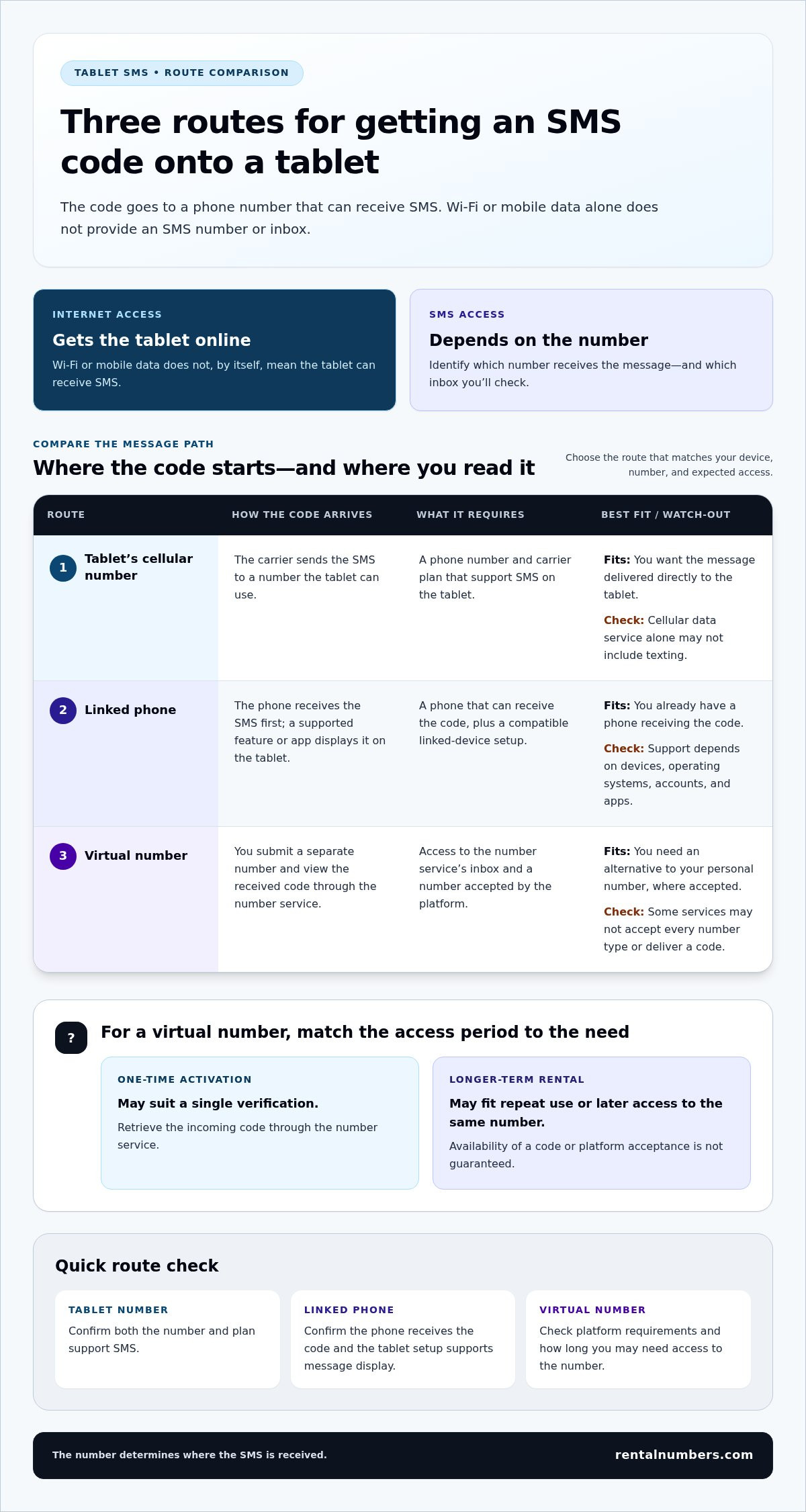
There are three ways to get a verification code onto a tablet: receive it through the tablet’s own carrier number, view a message received by a linked phone, or use an online virtual number. The route determines where the SMS first arrives and where you retrieve it. Understanding this message path helps you choose the right inbox before requesting a code.
Use this comparison to identify the route that fits your setup:
| Route | How the code reaches you | Best fit |
|---|---|---|
| Tablet’s cellular number | The carrier sends the SMS to a number and plan that support texting on the tablet. | You want messages delivered directly to the tablet. |
| Linked phone | The phone receives the SMS, then a supported feature or app displays it on the tablet. | You already have a phone receiving the code. |
| Virtual number | You submit a separate number, then view a received code through the number service. | You need an alternative to your personal number, where accepted. |
Using a tablet’s own cellular number
A cellular tablet needs both a phone number and carrier service that can receive SMS. Mobile data provides internet access, but it doesn’t prove the plan includes texting. Check your tablet and carrier documentation for device-specific requirements and setup steps. If SMS is supported, the carrier routes the code to the tablet’s messaging inbox.
Using a linked phone or a virtual number
A linked-phone setup is practical if your phone already receives the verification SMS. The phone remains the number source, while a supported feature or app shows its messages on the tablet. For example, Apple explains how to configure Text Message Forwarding between an iPhone and iPad. Device and software compatibility can affect the steps.
A virtual number provides a separate number for supported verification. With a one-time activation, you use a number for a single verification and retrieve the incoming code through the service. Choose a longer-term rental if you expect to need the same number again during its rental period. This can help with repeat access, but it doesn’t guarantee a platform will accept the number or deliver a code. Review the platform’s requirements before selecting a route.
If a virtual number suits your needs, review the available temporary verification numbers and choose based on whether you need one-time or repeat access.
Tablet SMS Options Compared: Personal Number, Linked Phone, and Virtual Number
The best option depends on how often you’ll need the number, how much personal-number exposure you’ll accept, and what the platform allows. Compare the setup, privacy implications, and repeat access before deciding how to use a tablet to receive SMS verification.
| Option | Setup | Privacy exposure | Repeat access | Potential limitations |
|---|---|---|---|---|
| Tablet’s own number | Use a tablet number and carrier plan that support SMS. | The platform receives your carrier number. | Usually practical while the number and service remain active. | Cellular data service alone may not include SMS. |
| Linked phone | Connect the tablet to a phone’s messaging feature or app. | The platform receives the phone’s number. | Useful while you retain access to the phone and linked setup. | Depends on compatible devices, settings, and messaging service. |
| Virtual number | Use an online number service and retrieve the incoming code there. | Separates the verification number from your personal number, but doesn’t guarantee anonymity. | Depends on whether you choose one-time access or a rental period. | A platform may reject virtual numbers or change its rules. |
Your tablet’s own number is often the most direct route if its carrier service supports SMS. A linked phone is practical if you already receive texts there and want to view them on the tablet. A virtual number can keep your personal number separate from a sign-up, but it doesn’t make an account anonymous or guarantee acceptance.
Avoid public SMS inboxes for sensitive accounts. Incoming messages may be visible to other users, exposing verification codes. Choose a method that gives you appropriate control over the number and messages.
Which option fits a one-time sign-up?
A one-time SMS activation may suit a single verification event, such as a sign-up that you don’t expect to repeat. Choose a number for the specific service you’re verifying, and use it only if the platform accepts that number type. No number route can guarantee acceptance or code delivery.
When is a longer-term number more suitable?
If you expect follow-up verification or may need to recover the account, a longer-term number rental can provide access to the same virtual number during its rental period. This is access for a set period, not permanent phone-number ownership. Consider long-term number rentals when future messages matter, and keep the account’s recovery requirements in mind.
How to Receive SMS Verification on a Tablet: A Step-by-Step Checklist
Use this workflow to identify the number source, request the code, and check the right inbox. The key to using a tablet to receive SMS verification is matching the number you enter with a message route you can access.
Set up the tablet and choose the number source
- Step 1: Identify the route. Decide whether you’ll use a tablet number with carrier SMS, a linked phone that receives texts, or an online virtual number. A tablet with mobile data may not have SMS service.
- Step 2: Confirm access. For carrier SMS, check that the tablet’s number and plan support incoming texts. For linked messaging, make sure the phone receives SMS and the tablet can display its messages. For a virtual number, choose one-time access for a single verification or a longer-term rental if you’ll need future messages.
Request the code and troubleshoot delivery
- Step 3: Enter the complete number. Check the country or region field, then enter the full number in the format requested by the target service. Don’t add or remove a country code unless the form’s instructions call for it.
- Step 4: Check the correct inbox. For carrier SMS, open the tablet’s messaging app. For a linked phone, check the tablet’s linked-message view or the phone itself. For a virtual number, open the service dashboard and review its SMS history or incoming-message area.
- Step 5: Troubleshoot before retrying. Recheck the number and country selection. Confirm you’re viewing the inbox tied to that number, then allow time for delivery. If the code hasn’t arrived, review the platform’s rules for supported number types and any resend limits. Retry only when the service permits it. Repeated requests can create confusion or trigger attempt limits.
Keep the route consistent: requesting a code for one number won’t send it to a different phone or inbox. Platform rules vary, and some services may not accept certain number types. Understand how the code will reach you before choosing an online number route.
If a virtual number fits your setup, choose a number for SMS verification and check incoming messages through the service dashboard.
Choose a Tablet-Friendly Verification Route for Your Next Sign-Up
Choose based on your tablet’s messaging setup and how long you’ll need access to the number. Use carrier SMS if the tablet’s number and plan support incoming texts. Use a linked phone if it already receives messages and you can view them on the tablet. Consider a virtual number when you need a separate number and the target service accepts that number type.
Match the number option to account access needs
For a one-time sign-up, a one-time SMS activation may fit a single verification request. If you expect the account to request another code, consider whether you’ll still be able to access the same number later. Review the account’s recovery options before registering with a temporary number.
A longer-term number rental may suit repeated verification during its rental period. It provides access to a number for a set period, not permanent ownership. Don’t rely on a temporary number as your only recovery method if losing access could lock you out. Add any available recovery email, authenticator method, or backup codes as appropriate for the account.
Use a virtual number without assuming every service accepts it
Acceptance can vary by service, country, and number type, and platforms can change their verification rules. A virtual number can separate a sign-up from your personal number, but it doesn’t guarantee privacy, account acceptance, or future access. Use the service dashboard to manage rentals and review SMS history. Keep the rental period aligned with the account’s recovery needs.
For using a tablet to receive SMS verification, choose the simplest route you can reliably access. Carrier SMS works when supported by the tablet and plan. A linked phone works when its messages are available on the tablet. A virtual number may fit a one-time activation or a longer-term rental, depending on whether you expect future verification.
Review the SMS verification pricing details and choose a number based on your access needs. Ready to use a virtual number? Choose a number for SMS verification.
Choose the Number Route That Fits Your Next Sign-Up
Using a tablet to receive SMS verification comes down to the number and message path, not the tablet’s internet connection alone. Use carrier SMS if your tablet and plan support it. Choose a linked phone if it already receives the code and you can view its messages on the tablet. A virtual number is another option when the service accepts that number type.
Match the number to how you’ll use the account. A one-time activation may fit a single verification. If you expect future codes, consider a longer-term number rental for access during its rental period. Neither option means permanent number ownership, so review the account’s recovery options before signing up. Platform rules can vary.
With RentalNumbers.com, you can manage rentals and view SMS history through the dashboard. Choose an option based on whether you need one-time verification or repeat access, then check incoming messages in the dashboard.
Choose a number for SMS verification and take the next step with a route that fits your setup and account needs.
Frequently Asked Questions
Can a tablet receive SMS verification codes without a phone?
Yes, if the tablet has a phone number and carrier service that support incoming SMS, or if you use a virtual number. A Wi-Fi-only tablet usually needs another number source. A linked-phone setup still depends on a phone receiving the message, even if you read it on the tablet. Before using a tablet to receive SMS verification, identify which number will receive the code and where you’ll access its inbox.
Can I receive SMS on an iPad or Android tablet?
Yes, some setups allow an iPad or Android tablet to display SMS. A cellular tablet needs a number and plan that support texting. You may also be able to view messages from a linked phone, depending on the device, operating system, account settings, and messaging app. Features vary by model and carrier. Check your device and carrier documentation before relying on the tablet’s own cellular connection for SMS. If you are having broader hardware issues with your mobile devices or tablets, you can learn more about First Help Tech for specialized repair support and device accessories.
Can a tablet receive a verification code over Wi-Fi?
Wi-Fi alone doesn’t provide a phone number or SMS inbox. It connects the tablet to the internet, but the code still needs to be sent to a number that can receive SMS. You might view the code over Wi-Fi through a linked-phone messaging feature or an online virtual-number service. In those cases, the phone or virtual number receives the message, and the tablet lets you view it.
Can I use a virtual number to receive SMS verification on a tablet?
Yes, a virtual number can be used for SMS verification where the target service accepts that number type. Enter the number in the requested format, then check the number service’s dashboard or SMS history for an incoming code. RentalNumbers.com provides one-time activations and longer-term number rentals. Acceptance and code delivery aren’t guaranteed, so review the target platform’s verification requirements before choosing a number.
Why is my tablet not receiving the SMS verification code?
First, confirm that the number you entered can receive SMS and that you’re checking the inbox connected to it. Check the country selection and full number format. For linked messaging, check the phone and the tablet’s message view. For a virtual number, review the service dashboard. If the code is missing, allow time for delivery, check the platform’s number restrictions, and follow its resend limits before trying again.
Is it safe to use a public SMS website for verification?
Public SMS inboxes can expose incoming messages and verification codes to other users. Don’t use them for sensitive accounts, account recovery, or services containing personal or financial information. A virtual number can separate verification from your personal number, but it doesn’t guarantee anonymity or account security. Choose a message route with access controls appropriate to the account, and use the platform’s available security and recovery settings.
Should I use a one-time number or a long-term number rental?
Choose a one-time activation for a single verification when you don’t expect to need that number again. Consider a longer-term number rental if you anticipate repeat messages during the rental period. It provides access to a number for a set period, not permanent ownership. Before signing up, review the account’s recovery options and make sure your number choice fits any future verification needs.