A temporary number can get you through one SMS step, but it can’t verify a TikTok Shop seller identity or business. If you’re considering a temporary number for tiktok shop verification, focus on two questions: will TikTok accept it for this step, and can you access it again if TikTok asks for another code later?
Using a separate number can help limit exposure of your personal phone number during SMS verification. But code delivery and acceptance can vary, and access to a one-time activation ends after the single code. If you can’t access the number again, a later security check or account change may be harder to complete.
This guide explains where a temporary number may fit in TikTok Shop onboarding, what it can’t replace, and how to handle the SMS step carefully. You’ll find a practical verification workflow, troubleshooting steps for delayed or rejected codes, and guidance on choosing between one-time activation and longer access. Keep the distinction clear: phone verification is one step; TikTok Shop may also require separate seller identity or business checks.
Key Takeaways
- A temporary number for tiktok shop verification may receive an SMS code, but TikTok decides whether to accept the number.
- Phone confirmation handles an SMS step. It doesn’t replace TikTok Shop’s separate seller identity or business checks.
- Use one-time activation for a single code. Consider longer number access if you may need future SMS verification.
- Follow the prompt in TikTok’s official app or website, request a code, and enter it only there.
- Before setup, review TikTok’s requirements for your market and plan how you’ll regain access if another code is needed.
TikTok Shop verification: what a phone number does, and does not, verify
A temporary number for TikTok Shop verification has a narrow function: it receives an SMS code at a number assigned for use. Entering that code may confirm access to the number for that step. It doesn’t guarantee TikTok will accept the number, and it doesn’t mean seller onboarding is complete.
TikTok controls which verification methods it accepts. The prompts can depend on your market, account type, and the flow shown during setup. Treat SMS confirmation as one possible security step, similar to two-factor authentication, not as proof that a shop is ready to sell.
For a general visual overview of virtual-number OTP flows, this video is separate from TikTok Shop’s official requirements:
Which TikTok Shop step may involve an SMS code?
Phone confirmation may appear during account access or seller setup. Follow the prompts in your TikTok Shop flow and review TikTok’s current Seller Center guidance for your market. Requirements can differ by region and change over time. If TikTok offers another verification method, use the option shown rather than assuming SMS is required.
A one-time SMS activation is designed to receive a single code when the number is accepted and the message arrives. RentalNumbers.com provides temporary numbers for SMS verification, including one-time activations. Number type, country, platform controls, and changing verification flows can affect whether a code is delivered or accepted.
What an SMS code cannot confirm
An SMS code confirms access to a phone number for that step; it does not prove the seller’s identity. TikTok Shop may separately ask for identity documents, business details, tax information, or payment details. These checks serve different purposes and must be completed according to the instructions for your account.
A temporary number doesn’t bypass seller eligibility rules or replace required documents. It also may not remain available for future security checks. Before using one, consider whether you’ll need that same number again to recover access or authorize an account change. Review TikTok’s official guidance for your market and seller account, then choose a phone-verification method you can access for as long as your account requires.
Can a temporary number work for TikTok Shop verification?
Possibly. A temporary number may receive a TikTok Shop SMS code, but TikTok decides whether to accept it. Delivery and acceptance can vary with the number type, country, account checks, and the verification flow shown at the time. A number working for a different TikTok action doesn’t guarantee it will work for Shop onboarding.
For current seller-specific rules, review the official TikTok Shop seller requirements. Follow the method and instructions shown for your market and account. Don’t treat a successful SMS step as approval for the entire seller account.
Privacy benefits and account-access trade-offs
Using another number can limit the need to share your personal phone number for an SMS step. It doesn’t make the account anonymous or ensure that TikTok will accept the number. The practical trade-off is future access: TikTok may request another code during login, a security check, recovery, or an account change.
Temporary SMS access cannot guarantee account acceptance or recovery. If access to the number ends after activation, you may not be able to receive a later code sent to it. Consider that risk before linking a number to a seller account you expect to keep using.
When longer access may matter
Choose based on whether you need one code or may need SMS access again. A one-time activation is intended for a single verification step, not repeat access. A longer rental keeps the number available during its rental period, which may help if future SMS checks matter. TikTok’s acceptance still isn’t guaranteed.
RentalNumbers.com offers long-term number rentals for situations where continued access is important. Consider how long you may need the number and what happens when the rental period ends. If you only need one code and accept that the number may not be available later, a one-time activation may fit that limited use.
The right choice depends on your recovery plan. If losing access to the number could disrupt account access, prioritize a method you can use again. To explore temporary SMS options for TikTok, visit RentalNumbers.com, then follow TikTok’s own prompts and requirements for your seller account.
One-time activation or longer rental: choosing a number for TikTok Shop
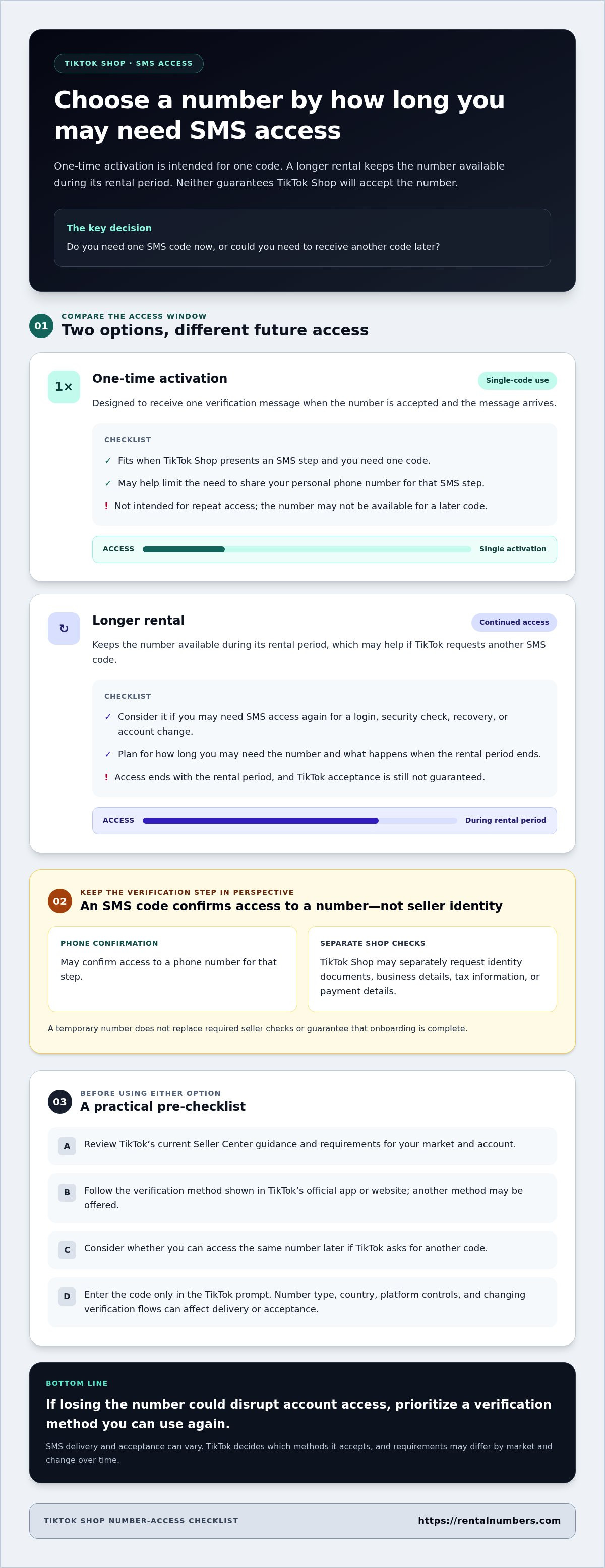
Choose based on the SMS access you may need after setup. A one-time activation is designed for one verification message. A longer rental keeps access available during its rental period, which may be useful if TikTok requests another code. Neither option guarantees that TikTok Shop will accept a number or use SMS for every check.
| Option | Intended use | Access period | Future SMS need | Key limitation |
|---|---|---|---|---|
| One-time activation | Receive one verification code | Single activation | Not intended for repeat access | The number may not be available for another code |
| Longer rental | Keep access to a number for a longer period | During the stated rental period | Useful if another SMS may be needed | Access ends with the rental period; acceptance isn’t guaranteed |
When a one-time SMS activation fits
Use a one-time activation if TikTok Shop presents an SMS step and you need one code to complete it. Treat it as a single-use choice, not as a number you can rely on for future login or recovery messages. TikTok may reject the number, delay the code, or offer a different verification method. Follow the official setup flow and don’t use a temporary number to bypass platform restrictions.
Review the available TikTok verification number options before starting. Keep the verification screen open, then use the number for the account setup step you’re completing.
When a longer number rental fits
Consider a longer rental if future login or security messages could matter. For example, if you expect to keep using the seller account, losing access to the original number could complicate a later verification prompt. A rental provides access during its stated rental period, not permanent ownership or indefinite availability.
Before choosing a duration, think through your recovery needs. Will you need to receive another SMS after initial setup? If yes, choose an access period that covers the time you expect to need the number. If no, a one-time activation may suit a single-code step, provided you accept that repeat access isn’t included. The service dashboard supports rental management and SMS history, so you can keep track of number activity.
How to try SMS verification safely, step by step
Use TikTok’s official app or website for account setup and code entry. Keep the verification prompt open, confirm the number format, and request the code needed for that step. This keeps the temporary number for TikTok Shop verification within a clear workflow and helps prevent you from exposing the code elsewhere.
Before requesting the code
Check the country and phone-number field shown in your TikTok Shop flow. Choose one-time activation for a single SMS step, or longer access if you may need another code later. Never share a verification code with another person or enter it on an unofficial page.
Follow the SMS steps
- Open TikTok Shop. Sign in through the official app or website and start the setup step that requests phone confirmation.
- Review the prompt. Confirm that SMS is the method TikTok offers and note the country and number format required.
- Select a number. Choose a number for the relevant country and match the access period to your expected needs.
- Request one code. Enter the number in TikTok’s phone field and submit the request once.
- Check for the message. Review the activation or SMS status. If the code arrives, enter it only in TikTok’s official verification screen.
If TikTok doesn’t send or accept the code
First, check that the selected country and number were entered correctly. Review the activation status or SMS history. If there’s no message, avoid sending repeated requests in quick succession. Follow TikTok’s on-screen retry instructions and wait as directed. If TikTok rejects the number, don’t assume another request will fix it.
If the prompt offers another verification method or a support route, use the option provided by TikTok. Number acceptance and code delivery can vary, so stop if the displayed instructions tell you to use a different method. Keep the code private throughout the process.
Compare the available TikTok number options before starting the SMS step, then follow the prompts in TikTok’s official flow. RentalNumbers.com provides temporary SMS verification and longer number rentals, so you can choose an access option based on whether you need one code or continued access.
Complete TikTok Shop setup with realistic expectations about number access
SMS confirmation is only one part of seller onboarding. A temporary number for TikTok Shop verification may help with a phone-code step if TikTok accepts it, but it doesn’t complete seller review or guarantee future account access. Treat number choice, seller documents, and account recovery as separate setup tasks.
Use this checklist before you finish:
- Accepted verification method: Follow the method offered in your TikTok Shop flow. Don’t assume SMS is available or accepted for every market or account.
- Code access: Confirm that you can receive the requested message. Consider whether you may need access to the same number for a later sign-in or security check.
- Seller documents: Prepare the identity, business, tax, or payment information TikTok requests for your account.
- Recovery plan: Review the security and recovery options available in your account before relying on a number you may not access later.
Requirements vary by market and seller account. US sellers can review the TikTok Shop Seller Center guidance for US sellers. For other markets, use the official Seller Center guidance and prompts for your location.
Keep control of future sign-ins
A number that works for initial activation may not be available when you need another code. Before connecting it to your shop, review TikTok’s available recovery and security settings. Keep access details secure, and don’t assume a one-time SMS activation can receive repeat messages. For broader context on protecting personal information during SMS verification, read this temporary number privacy guidance.
Finish seller onboarding through TikTok
Phone confirmation and seller review are different steps. Submit accurate identity, business, tax, and payout information through TikTok’s official seller flow whenever requested. RentalNumbers.com provides temporary numbers for SMS verification; it doesn’t replace TikTok’s eligibility checks, document review, or seller approval. Complete each prompt in the official app or Seller Center, and use only the information that applies to your account.
Once you’ve reviewed the verification method and planned for future access, choose a TikTok verification number for the SMS step. After store setup is complete, growing sellers looking to centralize product data across multiple digital storefronts can utilize platforms like Ommni to manage product information at scale.
Choose your SMS option with account access in mind
A temporary number for TikTok Shop verification may help with an SMS step, but it doesn’t guarantee TikTok will accept the number or approve your seller account. Phone confirmation is separate from seller identity, business, tax, or payment checks. Follow TikTok’s current requirements for your market, and submit any requested details through its official flow.
Match the number option to your access needs. One-time SMS activation is designed for a single verification step. Long-term number rentals are available if continued access may matter for future codes. Use the dashboard to manage rentals and review SMS history, and plan recovery before linking a number to your shop.
Ready to choose an SMS option for TikTok? Explore TikTok verification number options and select the access type that fits your setup. Keep your account details secure, follow each verification prompt, and plan for future access.
Frequently Asked Questions
Can I use a temporary number for TikTok Shop verification?
Possibly, if TikTok offers SMS verification and accepts the number. A temporary number for TikTok Shop verification may receive a code for that step, but acceptance and delivery aren’t guaranteed. Results can depend on the country, number type, and TikTok’s current checks. Follow the prompt in your Seller Center flow, and remember that an SMS code doesn’t replace seller identity or business verification.
Does TikTok Shop require a phone number to verify a seller account?
Phone verification requirements can vary by market, account type, and the setup flow TikTok presents. A phone number may be requested for account confirmation or a security step, but it doesn’t establish seller eligibility by itself. Review TikTok’s current official Seller Center requirements for your region. Complete any separate identity, business, tax, or payment checks requested for your seller account.
Why is my TikTok Shop verification code not arriving?
A code may be delayed or not delivered because the number or country was entered incorrectly, TikTok’s checks don’t accept the number, or the current flow is using another method. Recheck the details and SMS status. Avoid rapid repeat requests. Follow TikTok’s on-screen retry instructions, or use an alternate verification or support option if TikTok provides one.
Can I use the same temporary number for TikTok Shop account recovery?
Only if you can still access that number and TikTok accepts it for the recovery step. One-time SMS activation is intended for a single code, so don’t rely on it for later login or recovery messages. Before linking a number to a seller account, review TikTok’s recovery settings and consider whether continued access will matter. Losing access to the original number can complicate account changes.
Is TikTok Shop phone verification the same as seller verification?
No. Phone verification confirms access to a number for a particular step. Seller verification may involve separate checks, such as identity, business, tax, or payment information, depending on your market and account. Receiving or entering an SMS code doesn’t prove who owns the shop or complete seller onboarding. Follow TikTok’s official instructions for each check and submit accurate information through its platform.
Should I choose a one-time activation or a longer number rental?
Choose one-time activation if you need one SMS code and understand that repeat access isn’t included. Consider a longer rental if future login or security messages may require the same number. Access lasts during the rental period, so plan for how long you may need it. Neither option guarantees that TikTok will accept the number or deliver a code.
Is it safe to enter a TikTok Shop verification code on a temporary-number service?
Use the number service only to access the incoming SMS. Enter the verification code in TikTok’s official app or website, never on an unofficial page or in a message to another person. Treat the code as sensitive account information. If TikTok doesn’t accept the number or offers another verification method, follow the instructions in its official flow rather than sharing the code elsewhere.