
What if the number you use to register for Signal is no longer accessible when you need it again? A virtual number for signal messenger setup can separate registration from your personal number, but Signal may not accept every virtual number. Access after the first verification code matters just as much as receiving it.
Start by separating one-time verification from ongoing access. A one-time SMS activation is intended to receive a single verification code for a specific app. A longer-term rental provides inbound SMS access during the rental period. Neither option guarantees Signal will accept the number, so consider the risk of losing access before you register. This guide explains the verification process, outlines practical setup steps, and compares the two options so you can choose according to your privacy needs and plans for future access.
Key Takeaways
- Virtual numbers are accessed through a service rather than a personal SIM, but Signal acceptance can vary.
- For virtual number for signal messenger setup, receiving a verification code and completing registration are separate steps.
- Compare one-time activation with a longer-term rental based on whether you may need future SMS access.
- Review Signal’s current registration requirements before choosing a country or number, then follow the in-app verification steps.
- Read Signal’s account and number-change guidance before registering with a number that may expire or become inaccessible.
Can a virtual number work for Signal Messenger setup?
A virtual number may work, but compatibility can vary. You access it through a service rather than a personal SIM, which can separate the number used for registration from your everyday number. However, successful SMS delivery does not guarantee Signal will accept the number or complete registration.
A verification code confirms message delivery, not Signal account approval. Keep those outcomes separate when considering a virtual number for signal messenger setup.
This video shows a virtual-number verification example for WhatsApp, not Signal. Treat it only as a general illustration of the process. Signal’s registration flow and acceptance controls may differ.
What Signal uses a phone number for during registration
Signal’s standard registration flow uses a phone number to register an account and verify that number. Its privacy controls address separate questions, including who can see your number and who can find you by it. Changing those settings does not change the number used for standard registration, and using a virtual number does not hide every identity or account signal. For a broader overview of Signal and its privacy features, see the Signal (software) Wikipedia article.
Signal has also introduced an optional number-free registration feature for new accounts on Android beta 8.28 and later, according to current information. Availability may depend on your app version and account eligibility. Check Signal’s current registration instructions before choosing a number or assuming this option is available to you.
Why virtual-number compatibility can vary
Services may classify or reject some virtual and VoIP number ranges. The number’s country and provider, along with Signal’s current platform controls, can affect whether registration proceeds. A code may arrive successfully, yet Signal may still decline the number during account creation. SMS receipt alone is not proof that Signal accepts the number.
When comparing numbers, separate message delivery from account approval. A number listing can help you compare available options, but it cannot guarantee Signal acceptance. If you’re reviewing a virtual number listing, select a number for an SMS attempt and then follow Signal’s current in-app registration flow. Keep possible rejection in mind, especially if you need dependable access to the account later.
How Signal verification, privacy, and number access fit together
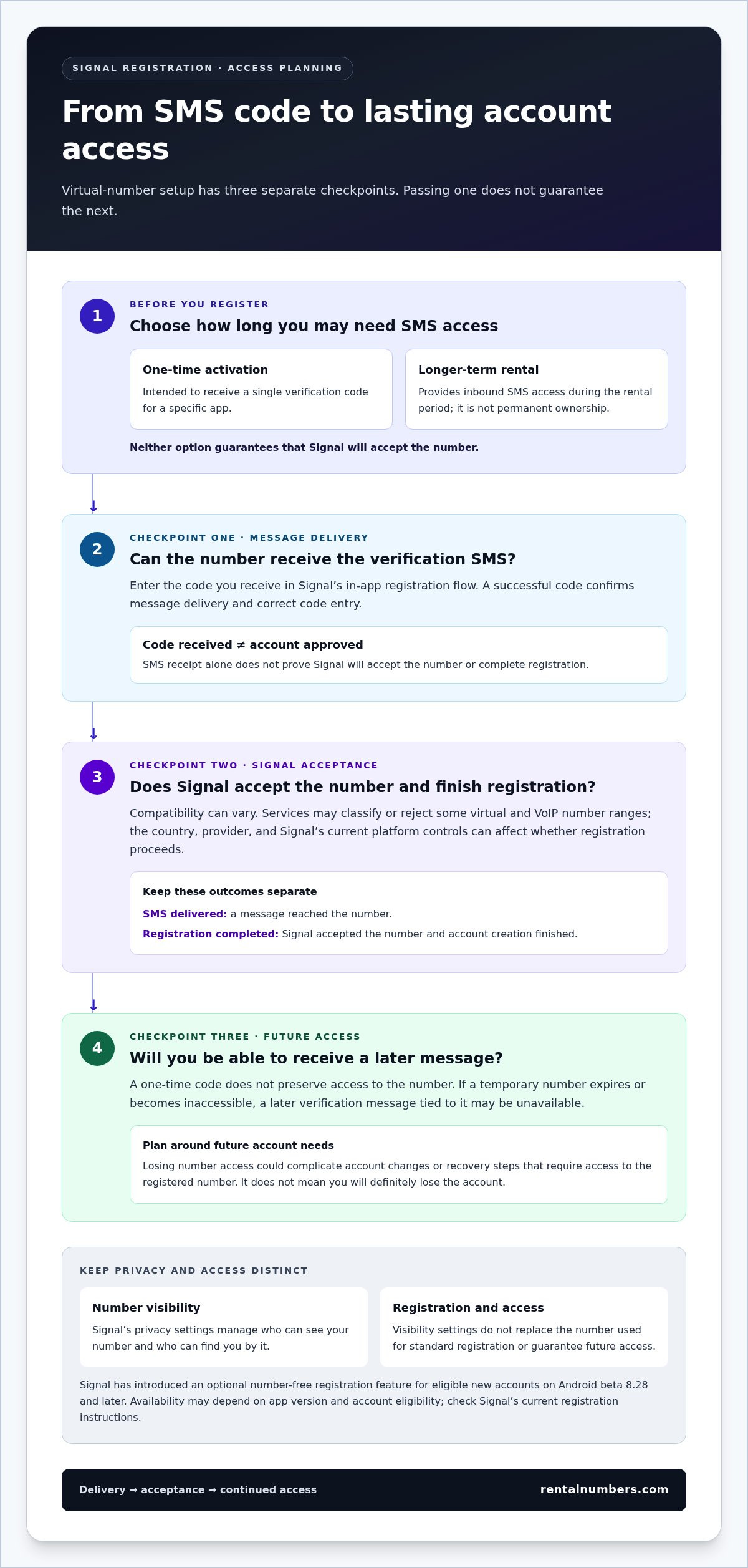
Think of registration as three separate checkpoints: the service must deliver a code, Signal must accept the number and complete registration, and you need a way to access the number later if another verification step arises. Passing one checkpoint does not guarantee you will pass the next. Understanding the difference helps you weigh privacy against continued access before choosing a number for virtual number for signal messenger setup.
A successful SMS code means a message reached the number and you entered the code correctly. It does not prove Signal accepted the number, registration finished, the number belongs to you permanently, or you can receive another message later. Consider the number’s access period, not just whether it can receive the first code.
Does hiding your number in Signal remove the registration requirement?
No. Registration requirements and number visibility are separate controls. Signal’s phone-number privacy settings let users manage who can see their number and who can find them by it. Those settings do not, by themselves, replace the number used for standard registration. Signal has also introduced an optional number-free registration path for eligible new accounts on supported Android beta versions. Check Signal’s current in-app options rather than assuming every account has the same registration flow.
These controls can reduce exposure of a personal number, but they do not promise anonymity or hide every account signal. Review Signal Messenger’s Official Privacy Policy to understand Signal’s stated approach to data and privacy. Check the app’s current phone-number privacy settings directly, since labels and options can change.
Why future access matters after the first verification
A one-time code can complete an immediate verification step, but it does not preserve access to the number. If a temporary number expires or becomes inaccessible, you may not be able to receive a later verification message tied to it. That could complicate account changes or recovery steps that require access to the registered number. It does not mean you will definitely lose the account, but it creates a dependency worth planning for.
Before registering, decide whether you only need one code or want continued inbound SMS access. A one-time activation is intended for the first purpose; a longer-term rental keeps inbound SMS access available during the rental period. Neither guarantees Signal acceptance, and a rental is not permanent ownership. If continued access matters, compare the long-term number rental option with your expected account needs. For more context on temporary-number privacy and safe use, focus on the distinction between reducing exposure of your personal number and keeping access to the number you register.
Make the choice deliberately: Signal privacy settings affect visibility in the app, while number access affects whether you can receive future messages. Considering these separately can help you reduce personal-number exposure without mistaking a successful first code for lasting account control.
One-time activation or longer rental: which virtual number fits Signal?
Choose according to how long you may need to receive SMS, not just the first verification attempt. A one-time activation is intended for receiving a single code. A longer rental provides inbound SMS access during the rental period. Neither guarantees Signal will accept the number, and neither gives you permanent ownership.
Compare the two options across three practical points:
One-time SMS activation
- Access duration: Intended for one verification code for a specific app.
- Best fit: You need a single registration code and accept that Signal may not approve the number.
- Future SMS: Do not rely on it for later messages or account changes.
Long-term number rental
- Access duration: Inbound SMS is available during the rental period.
- Best fit: You want continued access to messages sent to the number while the rental remains active.
- Future SMS: Access is time-limited, not permanent number ownership.
For the cost structure of these options, review SMS activation and rental pricing. Compare them based on the access you need, not on an assumption that a longer or higher-cost option guarantees Signal registration.
When a one-time SMS activation may fit
Choose a one-time activation when your immediate goal is to receive a single code. It can suit a one-off attempt if you do not expect to need the number again. But receiving a code is only one part of setup. Signal may still reject the number or registration attempt.
Consider what you would do if Signal later asked you to verify the number again. If you could not receive another SMS, one-time activation may not meet your account-access needs. Treat it as an option for a focused verification attempt, not ongoing control of the number.
When a longer rental may fit better
A longer rental may suit you if you want to receive inbound SMS beyond the first code. It can preserve access during the rental period if a later account step requires a message to the same number. Review the duration of the rental you choose, then decide whether it matches your expected use.
Long-term virtual number rentals provide inbound SMS during the rental period, but access ends according to the rental term and does not transfer permanent ownership. If continued access matters, choose with that limit in mind. For a virtual number for signal messenger setup, weigh privacy, uncertain acceptance, and the possibility of future verification before selecting either option.
How to try Signal setup with a virtual number, step by step
Keep number selection separate from Signal’s registration screens. First review Signal’s current phone-number requirements and registration options. Then choose an option that fits your access needs. A virtual number for signal messenger setup may receive a code, but Signal decides whether to accept the number and complete registration.
- Step 1: Review Signal’s current requirements. Open Signal’s official registration guidance or app before selecting a country or number. Confirm which registration methods are currently available to you. Requirements and screens can change, so do not rely on old instructions or assume every number type will be accepted.
- Step 2: Select a number arrangement. Compare the country and service options shown in the number listings. Availability can vary. Decide whether a one-time activation for a single code fits your plan or whether you need a rental that provides inbound SMS during its rental period. For an overview of the registration-code process, see how SMS activation works.
- Step 3: Enter the number in Signal. Open the official Signal app and follow its current registration prompts. Select the matching country code and enter the number in the requested format. Check the digits before submitting, and request verification only through the app’s displayed flow.
- Step 4: Check for the incoming SMS. If you’re using a rental, monitor its dashboard and SMS history for an incoming message. For a one-time activation, follow the service’s displayed instructions to view the code. Enter the code only in Signal’s official app. Do not share it with anyone or enter it on an unrelated page.
- Step 5: Respond to delays or rejection carefully. If no code appears, check the dashboard and follow the retry guidance shown in the service and Signal app. Avoid repeated code requests. If Signal rejects the number, stop. Platform controls can block registration even when an SMS was delivered, and repeated attempts may not resolve the rejection.
After entering the code, follow any remaining prompts in Signal. If registration completes, review the account’s number privacy and access settings. If it does not, do not assume the number is suitable just because it received an SMS. Review Signal’s current requirements before deciding whether to try again with a different number arrangement.
Choose the access duration before you begin. A one-time activation is intended to receive a code for a single attempt. A longer rental keeps inbound SMS available during the rental period, but does not provide permanent number ownership. Consider future account access as well as the initial registration step.
To get started, review the available virtual number options and select an arrangement that fits your verification and access needs.
Keep control of your Signal account after virtual-number setup
Registration is only the first decision. For a virtual number for signal messenger setup, weigh three things together: how much personal-number exposure you want to reduce, the possibility that Signal may reject a number, and whether you will need SMS access again. A number that works for one registration attempt may not remain accessible for later account steps.
Before relying on a temporary number, review Signal’s current account, verification, and number-change guidance. Follow its instructions before changing or losing access to the registered number. Do not assume a number used once will be available again. Planning ahead gives you a clearer path if you later need to update account details.
Plan for number changes and account recovery
Keep a record of the number you used and its access period. If Signal’s current instructions call for verification when changing a number or completing another account step, consider how you would receive that message. Losing access can make the process harder, although the exact steps depend on Signal’s current features and your account situation.
Review Signal’s official guidance before making account changes. Consider both your privacy and verification plans, especially the difference between limiting exposure of a personal number and retaining access to the number you register.
Choose a RentalNumbers.com option for your use case
Use a one-time SMS activation when your aim is a focused attempt to receive a registration code. It does not promise Signal acceptance or continued control of the number. Choose a longer-term rental if you need inbound SMS access during its rental period. Rental access is time-limited, not permanent number ownership.
RentalNumbers.com’s dashboard lets you manage rentals, view SMS history, and track transactions. Use it to keep track of the access arrangement you selected and review incoming messages where applicable. The dashboard does not control Signal’s acceptance decision, so keep that distinction clear when comparing options.
- Prioritize a single code attempt: Consider one-time activation, while allowing for the possibility that Signal may not accept the number.
- Need later SMS access: Consider a longer rental and plan around its rental period.
- Unsure about future access: Read Signal’s current account guidance first, then choose according to your recovery and number-change needs.
Make your choice based on the access you need, not just how quickly you can receive an initial code. Browse available virtual numbers and choose a one-time activation or rental arrangement that fits your privacy goals and future-access plans. Signal acceptance is not guaranteed.
Make your next step a deliberate one
Before starting a virtual number for signal messenger setup, decide what you want the number to protect and what access you may need later. Treat registration as part of your account-access plan, not just a code-entry task. Check Signal’s current instructions, choose an option that matches your privacy priorities, and keep a clear record of the account details you need to manage access.
Compatibility is uncertain, so do not build your plan around a guaranteed result. If Signal does not accept a number, pause and review its current guidance instead of repeating requests. Thinking through access now can help you avoid trading short-term privacy for future account-access problems.
Ready to compare options for your intended use? Browse available virtual numbers and choose a one-time activation or longer-term rental that fits your privacy and account-access needs.
Frequently Asked Questions
Can I use a virtual number to set up Signal Messenger?
Possibly, but Signal may not accept every virtual number. For a virtual number for signal messenger setup, follow Signal’s current registration flow and enter the number in the format requested for its country. Receiving an SMS is only one part of the process. If you need to keep the account, consider future access before choosing a number that may only be available briefly.
Does Signal accept VoIP or temporary phone numbers?
Acceptance can vary. Signal may reject a VoIP or temporary number based on its number range or current platform controls. The country and provider can also affect whether registration proceeds. The ability to receive SMS does not reliably indicate whether Signal will accept the number. Follow Signal’s current prompts, and stop if the app rejects it.
What should I do if Signal does not send a verification code?
First, check that you entered the number and country code correctly. If you’re using a rental, look in its dashboard and SMS history for an incoming message. Follow any retry instructions shown in Signal, and avoid requesting codes repeatedly. If the number still receives nothing, stop and reassess the number or registration method. Do not share a verification code or enter it anywhere outside Signal’s official app.
Can I use a rental number if Signal asks me to verify again later?
Only if you still have access to that number and can receive inbound SMS. A rental supports incoming messages during its rental period, so a later verification request may be possible within that period. After access ends, you may not be able to receive another code. Before registering, read Signal’s current account and number-change guidance and decide how you will handle verification after the rental ends.
Does hiding my phone number in Signal mean I can register without one?
No. Hiding your number from other users and registering an account are separate matters. Signal’s phone-number privacy settings control visibility and discoverability. Changing them does not itself remove a number requirement from the standard registration flow. Signal has also introduced an optional number-free registration feature for eligible new accounts on Android beta 8.28 and later. Check the current app and official instructions to see which options apply to you.
Is a one-time SMS activation enough to keep access to a Signal account?
No. A one-time SMS activation is intended to receive a code for a single verification attempt, not to preserve access to the number. If Signal later requires another message and the number is no longer accessible, you may not be able to receive it. Plan for future verification and number changes before choosing one-time access.
Can I use a virtual number for Signal without revealing my personal number?
A virtual number can let you register without entering your personal number if Signal accepts it. This may reduce exposure of your personal number during registration, but it does not make you fully anonymous or conceal every account signal. Signal’s privacy settings still matter, as does continued access to the number you register. Choose according to the exposure you want to reduce and the access you may need later.