
The right country code isn’t enough. An international virtual number for sms verification can separate a verification step from your personal number, but a platform may reject a virtual number or fail to deliver its code. The destination service, country code, number format, and rental duration all matter.
Start with the platform you need to verify and the country codes its form accepts. Then match the number’s duration to your plans: a one-time activation fits a single verification task, while a longer rental may suit an account you’ll need to access again. Neither option guarantees that a platform will accept the number or send a code.
This guide explains how international virtual numbers work and what to compare before choosing one. You’ll learn how to select a suitable country code, what to check if an SMS doesn’t arrive, and when a one-time activation or longer rental makes sense. You’ll also see how a dashboard can help you manage a rental and review received SMS history.
Key Takeaways
- Match the country code to the destination service’s requirements, but remember that a matching code doesn’t guarantee acceptance.
- Choose an international virtual number for sms verification based on the platform, number format, and whether you’ll need access again.
- Select the number before entering it on the destination platform, so you can check the country code and full format first.
- If a code doesn’t arrive, review the number and service selection, then follow the destination platform’s instructions and terms.
- Use a one-time activation for a single task or a longer rental when future account access matters. A dashboard can help you manage rentals and review SMS history.
Table of Contents
- What an international virtual number for SMS verification does
- How international SMS verification works from number selection to code
- Compare international number options by country, service, and duration
- Use an international virtual number carefully and troubleshoot common issues
- Get an international SMS verification number through RentalNumbers.com
What an international virtual number for SMS verification does
Some sign-up forms require a phone number before sending a verification code. If you’d rather not use your personal number, an international virtual number for sms verification gives you a separate destination for that incoming message. Enter the number on a supported service, then access SMS received for it online.
A virtual number works through an online service rather than a physical SIM card supplied to you. The service handles the number and displays received messages through its interface. For verification, the number’s role is specific: receive an incoming SMS so you can retrieve the code and enter it on the account form. It doesn’t create an account or complete verification on your behalf. For a general overview, see What is a virtual number?
Availability and acceptance are separate questions. A country code may be available to select, but that doesn’t mean a particular platform will accept the number. Platforms set their own rules and may restrict virtual numbers, so assess compatibility without treating it as guaranteed. RentalNumbers.com provides international number options for SMS verification.
How the number, country code, and SMS code fit together
The country code identifies the numbering region and appears before the rest of the phone number. Follow the destination service’s country selector and formatting instructions. If it asks you to select a country separately, choose the region that matches your number and enter the remaining digits in the phone field. Don’t enter the country code twice.
An OTP, or one-time password, is a code sent for a specific verification step. The process is straightforward: the platform sends an SMS to the number you submitted, the online service receives it, and you retrieve it from the number’s message view. Enter the code only in the intended verification field. Codes can expire, and successful delivery or acceptance isn’t guaranteed.
What virtual-number verification does and does not provide
Using a separate number can keep a signup from being directly tied to your personal phone number. That separation may help limit where you share your personal contact detail, but it doesn’t guarantee anonymity. The platform may still collect other account or device information, and separating numbers doesn’t protect an account from unauthorized access.
Keep control of any account you expect to use again. Before choosing a temporary option, consider whether you’ll need the same number for a future login or recovery step. Follow the destination service’s terms and use verification only for accounts you’re authorized to create or access. If a platform rejects the number or no code arrives, changing the country code may not solve the problem. The platform’s restrictions, number format, or message delivery could be the issue.
How international SMS verification works from number selection to code
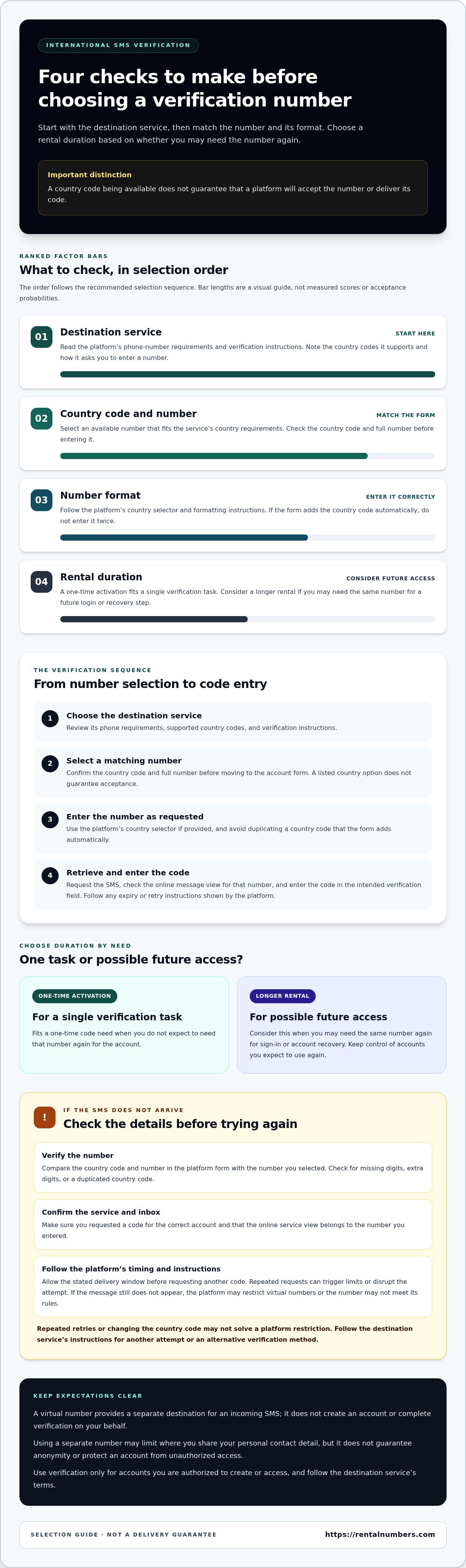
Keep number selection and account verification as separate steps. First identify the destination service and read its instructions. Then choose an available number that fits the service’s country and format requirements. Once you’ve selected the number, enter it on the platform and request a code. This order helps you catch a mismatch before submitting the phone field.
The verification sequence, step by step
Use this sequence for an international virtual number for sms verification. Platform instructions take priority because services can use different country selectors, number formats, and verification rules. The SMS verification process explains the service-specific steps for receiving a code through RentalNumbers.com.
- Choose the destination service. Review its phone-number requirements and follow its verification instructions. Note any supported country codes or directions for entering the number.
- Select a matching number. Choose an available country option that fits the account form. Confirm the full number and country code before moving to the platform. A listed country option doesn’t guarantee acceptance by the destination service.
- Enter the number on the platform. Use the platform’s country selector if it has one, then enter the number in the requested format. Avoid duplicating the country code if the form adds it automatically.
- Request and retrieve the code. Submit the number and request the SMS. Check the online inbox for a message associated with that number. Enter the code in the destination service’s verification field, following any expiration or retry instructions shown there.
What to do when the verification SMS does not arrive
Start by checking the details you can verify. Compare the country code and number in the platform form with the number you selected. Look for missing digits, extra digits, or a duplicated country code. Confirm that you requested a code for the correct account and that the number in your online service is the one you entered.
Allow the delivery window stated by the destination platform before requesting another code. Repeated requests can trigger limits or disrupt the verification attempt. If the message still doesn’t appear, the platform may restrict virtual numbers, or the number may not meet its rules. Repeated retries won’t necessarily resolve a restriction. Follow the platform’s instructions for another attempt or an alternative verification method.
Use a one-time activation when you need a code for one verification task. If the account may require the number again for sign-in or recovery, consider whether a longer rental better fits that need. RentalNumbers.com provides temporary numbers for one-time activations and longer rentals, with a dashboard to manage rentals and review received SMS history. Explore temporary SMS number options when you’re ready to choose.
Compare international number options by country, service, and duration
Choose an international virtual number for sms verification by considering three things together: the destination service, the country or region its form expects, and how long you may need access. A country code alone doesn’t show whether a platform will accept a number. Treat it as one selection detail, not a compatibility guarantee.
Use this comparison to define the task before selecting a number. Match the number you choose to the country field on the destination platform’s form.
| Country code | Intended service | Duration | Follow-up access |
|---|---|---|---|
| Choose a code matching the platform’s stated region, if it specifies one. | A single service with a clear phone-verification form. | One-time activation for one SMS task. | Suitable when you don’t expect to use the number again. |
| Choose from available regions supported in the number selection. | An account that may request another code later. | Longer rental. | Consider if future login or recovery may depend on the number. |
| Use the country code that matches the selected number. | A service with its own country selector or number-format instructions. | Choose based on expected account use. | Keep the number duration aligned with likely verification needs. |
Browse available international numbers to compare options. Your selection still needs to fit the destination platform’s rules and phone form.
Choose a country code that fits the account form
Start with the destination platform’s instructions. If they specify a country or region, use that as your guide. Select a matching number, then enter its country code in the corresponding field. If the form adds the code after you choose a country, enter only the remaining digits. A particular code doesn’t guarantee verification.
Match number duration to account recovery needs
A one-time activation can suit a single verification SMS. If you might need another code for a later login or recovery step, plan for continued access instead. A longer rental may better fit that need. Review long-term number rentals when ongoing access is relevant, and consider how losing access to the number could affect your account.
Before choosing, decide whether this is a one-off signup or an account you’ll keep using. A one-time option may fit the first; for the second, factor future verification into your duration decision. Neither a longer rental nor a country selection overrides platform restrictions, so follow the destination service’s instructions and terms.
Use an international virtual number carefully and troubleshoot common issues
A virtual number can help separate a signup from your personal number, but the destination platform’s rules still apply. A platform may restrict virtual numbers or reject one after you submit it. An international virtual number for sms verification is a way to receive a code, not a promise of account approval. Use it only for accounts you’re authorized to create or access, and follow the platform’s terms.
Plan for account continuity before requesting a code. If you lose access to the number, you may also lose a route for future login checks or account recovery. This matters most for accounts you expect to keep using. A single verification task and an account you’ll rely on later call for different access plans.
Protect account access after verification
Review the platform’s recovery settings before using a temporary number. Check whether you can add another recovery method, such as an email address or authenticator option. Don’t rely on a number you can’t access later as your only recovery route. Separating numbers doesn’t guarantee anonymity or protect an account by itself. Use a strong, unique password and enable the account protections the platform provides.
If you choose a longer rental, keep track of its access period and any later verification needs. A dashboard that lets you manage rentals and review SMS history can help you keep the number’s role clear. Don’t assume a one-time activation will remain available for future account checks.
Troubleshoot rejection, delay, or an unexpected code
If a number is rejected or a message is delayed, check the basics before trying again. Confirm that you selected the intended service and that the country code and remaining digits match the platform’s phone field. Review the platform’s error message and instructions. Repeated code requests may run into attempt limits, so pause if the service tells you to wait.
If a code arrives late, use only the current valid code and follow the platform’s instructions. Older codes may have expired or been replaced after a new request. Don’t share a code with anyone or enter it outside the account’s official verification flow. If the platform rejects the number again, further submissions may not help because the platform may restrict virtual numbers for that verification.
Before requesting a code, use this quick checklist:
- Confirm the account is yours to create or access, and review the platform’s terms.
- Check the selected service, country code, and complete number format.
- Decide whether you’ll need the number for future login or recovery.
- Follow the platform’s delivery window and avoid repeated requests.
- Keep the received code private and enter it only in the intended verification field.
Choose the duration around your access needs, not just the first code. For a one-time task, use a one-time activation; for future verification, consider a longer rental. Choose an SMS number option that fits the task, and follow the destination platform’s instructions.
Get an international SMS verification number through RentalNumbers.com
Once you’ve reviewed the destination service’s rules, chosen a suitable country code, and considered whether you’ll need future access, select an option that fits the task. RentalNumbers.com provides temporary numbers for one-time SMS activations and longer rentals. The service supports a range of popular apps and websites, but no number guarantees acceptance or delivery. Platform rules still apply.
Use the dashboard to manage rentals, view received SMS history, and track transactions. These tools help you organize rental activity and review messages associated with your number. Choose the duration based on how you expect to use the account, not just how quickly you want to complete the first verification.
Choose between a one-time activation and a longer rental
A one-time activation suits a single code-based verification task. Choose it when you need to receive one SMS for a signup or verification step and don’t expect to use the number again. This keeps the option aligned with a short, defined task.
Choose a longer rental if you expect multiple incoming SMS messages or may need to verify the account again later. Before selecting a duration, consider future sign-ins and recovery needs. If the destination service sends another code later, continued access to the number may matter. A longer rental doesn’t guarantee the platform will accept the number. For broader terminology and use cases, consult the virtual phone number guide.
Start with the country and service you need
Begin with the destination service. Review its phone-number instructions, then select that service and a relevant country option in the platform. Check that the country code matches the number and the destination form. Choose from the options available in the selection rather than assuming a particular country or number will work with every service.
Before proceeding, confirm that your choice fits both the verification task and your account’s likely future access needs. One-time activation fees vary based on the country of the number and the popularity of the service being verified. Longer rentals are a separate option for continued access to a number.
If you need one code, choose a one-time activation. If you may need continued SMS access, consider a longer rental and manage it through the dashboard. Keep the destination platform’s terms in view, and use verification only for an account you’re authorized to access. The number provides a way to receive incoming verification messages, not a guarantee of approval, account recovery, or anonymity.
Choose an international number for SMS verification that matches your service and access needs.
Make your next verification choice with confidence
Before selecting an international virtual number for sms verification, decide what the account will need after signup. If you expect future login or recovery checks, plan for continued access. If you only need one code, focus on that single task. Then match the available country option to the destination service’s instructions.
Review the service and number options, choose a duration that fits your account plans, and follow the platform’s verification process. Acceptance and SMS delivery depend on the destination service, so no number should be treated as a guaranteed route through verification.
RentalNumbers.com offers worldwide temporary-number options for one-time activations and longer rentals, with a dashboard for managing rentals, reviewing SMS history, and tracking transactions. Choose the setup that fits your verification task and future access needs.
Choose an international number for SMS verification and move forward with a clear plan.
Frequently Asked Questions
Can an international virtual number receive an SMS verification code?
Yes, an international virtual number for sms verification can receive a code when the destination service accepts the number and successfully sends the message. For example, after entering a selected number in a signup form, check the associated online inbox for the incoming SMS. Delivery isn’t guaranteed. The platform may block the number, or its verification rules may require a different type of phone line.
Will every website accept a virtual number for SMS verification?
No. Each website sets its own verification rules, and some may reject virtual numbers during signup or later checks. A number that works for one account type might not work for another on the same platform. Read the service’s instructions and terms before submitting a number. If the form says the number can’t be used, follow the platform’s stated alternatives rather than repeatedly submitting it.
How do I choose the country for an international SMS number?
Use the destination service’s stated country requirements as your starting point. If its form asks you to select a country, choose the region that matches your selected number. For example, don’t pair one country’s code with a number from another country. If the platform gives no country preference, choose an available option that fits its phone-number format without assuming the code ensures acceptance.
Is a one-time virtual number suitable for account recovery?
Usually not if you expect the account to rely on that number for later recovery. A one-time activation is intended for a single verification task, so it may not be available when you need a password reset or sign-in code in the future. Before using one, check whether the account lets you add another recovery method. Keep at least one recovery route you can continue to access.
What should I do if the international verification code does not arrive?
First, check that the selected service and full number match what you entered in the account form. Review the platform’s delivery instructions and allow its stated waiting period before requesting another code. If you’ve already requested several, pause and check for an attempt-limit message. If the message remains missing, the destination service may restrict the number or the SMS may not have been delivered.
Is using a virtual number for SMS verification private?
It can keep you from entering your personal phone number in a particular signup form, but it doesn’t make the account anonymous. The website may collect other information during registration or use. Treat verification codes as sensitive credentials: enter them only on the official service, don’t share them with another person, and use a strong, unique password to protect the account.
Should I use a one-time activation or rent a number longer?
Choose a one-time activation for a single verification task when you don’t expect to need that number again. Consider a longer rental if you anticipate multiple incoming verification messages or future account access that may depend on the number. Think about the account’s expected use before selecting. If you’re unsure whether recovery will require another SMS, review the platform’s recovery settings first.