
What if the number you shared for one login is now visible through an old profile, an app permission, or a data broker? It’s easy to lose track of where you entered it. Learning how to control who has your contact info starts with finding those sharing points, then deciding which ones still need access.
App permissions and account visibility settings do different things. One can let an app access your device’s contacts; the other can make your number discoverable on a profile. Review both, along with saved account details, before removing your number. Keep it where you need verification or account recovery, and limit access where you don’t.
This guide shows you how to audit accounts, apps, social profiles, and people-search sites, then reduce unnecessary exposure without disrupting essential sign-ins. You’ll also learn when a separate number makes sense: one-time SMS activation can suit a single verification, while a long-term number rental can support recurring inbound SMS needs. A separate number won’t remove information you’ve already shared or guarantee that a service accepts it, but it can help you limit which accounts receive your primary number going forward.
Key Takeaways
- To learn how to control who has your contact info, map where your number is stored, visible, or shared, including accounts, apps, and public listings.
- Check contact access separately from profile visibility and contact syncing. Changing one setting may not change the others.
- Audit account settings and app permissions before removing your number, and confirm your recovery options still work.
- Use your primary number where continuity matters, and consider a separate number for selected sign-ups to limit future exposure.
- Match the number option to the need: one-time SMS activation for a single verification, or a long-term rental for ongoing inbound SMS.
How to Control Who Has Your Contact Info: Map Where Your Number Appears
Start with an inventory, not a settings change. Your number may be stored in an account for sign-in or recovery, shown on a profile, uploaded from an address book, or included in an old form. These are separate routes. A number saved for account recovery isn’t automatically visible to other users, and hiding it on a profile doesn’t remove it from the account’s records.
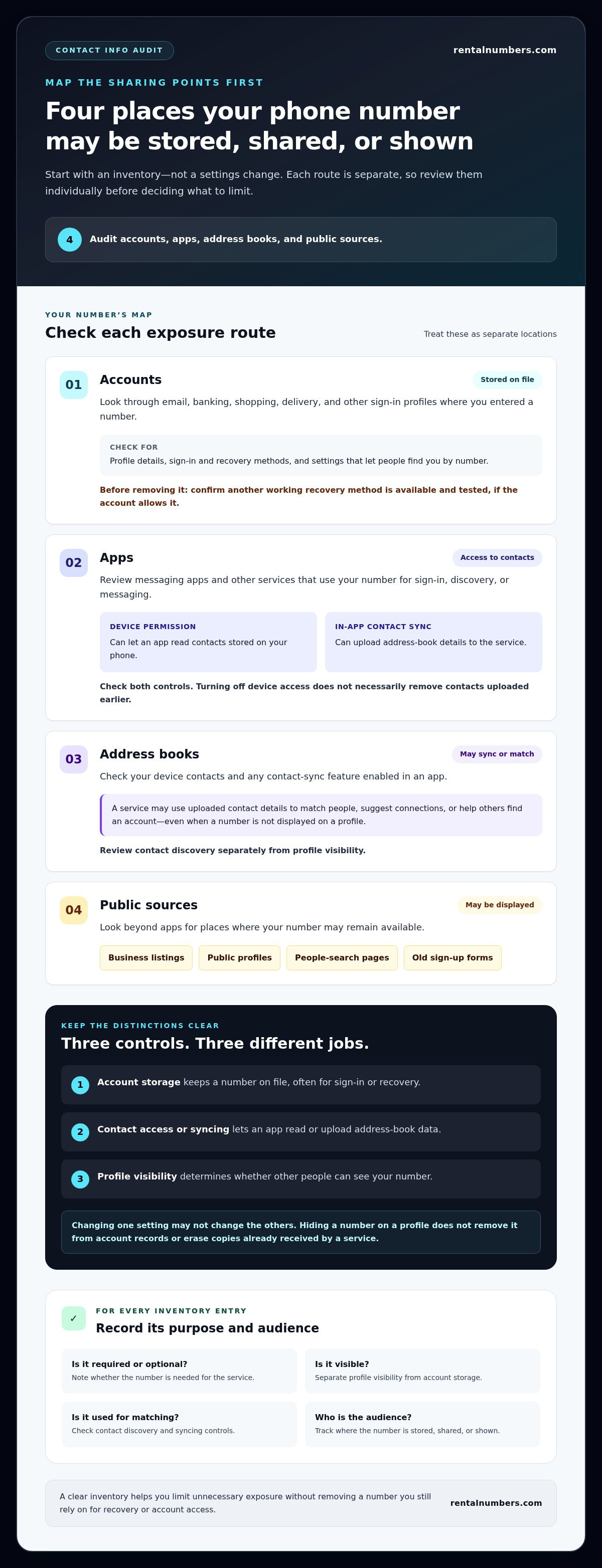
Audit four places: accounts that store your number, apps that can access it, contacts that may sync it, and public sources that display it.
Use this checklist to build your map:
- Accounts: Email, banking, shopping, delivery, and other sign-in profiles where you entered a number.
- Messaging apps: Services that use your number for sign-in, discovery, or messaging.
- Social profiles: Profile fields, visibility controls, and search or discovery settings.
- Address books: Your device contacts and any contact-sync feature enabled in an app.
- Public sources: Business listings, public profiles, people-search pages, and old sign-up forms.
Where can your phone number be stored or exposed?
Check account details separately from app permissions. An account may store your number for recovery, while an app permission may let an app read your device’s contacts. Contact syncing is another setting: it can upload address-book details to a service, where contact-discovery features may use them to match people. Review the relevant privacy settings in each service because menus and controls vary by platform.
Look beyond apps, too. Your number may remain on a public business listing, a social profile, or a form you completed years ago. Record each location and note whether the number is required, optional, visible, or used for matching. This turns a vague privacy concern into a concrete list of places to review.
What does “control who has your contact info” mean?
Control means managing where your number is stored, who can see it, which apps can access or sync contacts, and where you share it next. It doesn’t let you delete the number from someone else’s address book or guarantee removal from every third-party record. If a service already received your number, changing a profile setting may not erase its existing copy.
Also separate access from communication. Someone who knows your number may be able to call or message it, but that doesn’t mean they can see it in a profile or access your account. Conversely, an app may receive contact data through permissions or syncing without making your number publicly visible. Track each type of exposure separately.
For each entry in your inventory, note its purpose and audience. Is the number needed for recovery? Can other users find you with it? Does the app need contact access for a feature you use? These distinctions help you decide what to change without removing a number you still rely on.
How Contact Information Moves Through Accounts, Apps, and Contacts
A phone number can move through several data paths without being publicly displayed. An account may store it for sign-in or recovery. A separate app permission may let an app read your address book. Contact syncing may upload that address book to the app’s servers, while a discoverability feature may use those details to suggest connections. These controls serve different purposes.
Account storage keeps a number on file, contact access lets an app read address-book data, and public visibility determines whether other people can see your number. Treat each as a separate setting when deciding how to control who has your contact info. For more on the broader digital-rights context, see the Electronic Frontier Foundation’s digital privacy resources.
Account settings and phone-number visibility
Review each account’s profile, sign-in, recovery, and discoverability controls. A number listed as a recovery method may not appear on your public profile, but it can still help secure or restore access to the account. Look for separate options governing who can find you by your number.
Google Accounts provide one example of this distinction. Open the account’s current settings and review the phone number, recovery options, and visibility or discovery controls. Menu names can change, so use the account’s settings search or help content to locate them. Before removing a number, add and test another working recovery method if the account allows it. Don’t disconnect the only method you can use to regain access.
App permissions, address books, and contact discovery
Device permissions govern whether an app can access contacts stored on your phone. Contact-upload or sync controls inside the app govern whether address-book details are sent to the service. Turning off device access can limit future access, but it doesn’t necessarily delete contact data uploaded earlier. Check both locations and look for an in-app option to remove uploaded contacts or stop syncing them.
Contact discovery creates another connection. A service may compare uploaded address-book details with its users to suggest people or help others find an account. This can make your number useful for matching even if it isn’t displayed on your profile. Review discovery options alongside profile visibility, rather than assuming one setting controls both.
Use this sequence for each relevant account and app:
- Check whether the number is stored for sign-in or recovery.
- Review who can see or find your profile by number.
- Inspect device-level contact permissions and in-app sync or upload controls.
- Remove access you don’t need, then check whether previously uploaded contacts can be deleted.
A separate number can help limit which services receive your primary number during selected verification flows. It won’t undo earlier sharing, and a service may not accept every number. Choose one-time SMS activation for a single verification, or a rental for ongoing inbound SMS needs.
Personal Number, Privacy Settings, or Separate Number: Compare Your Options
Choose based on what you need to protect and what the account needs to keep working. Keeping one number is simple. Privacy-setting cleanup can reduce visibility without changing your number, while a separate number can limit which selected sign-ups receive your primary number. None is a complete reset: a second number only limits future exposure where you use it, and it can’t retract information already shared.
Use this comparison to match the approach to the account’s purpose:
| Option | Convenience | Separation | Continuity | Account recovery |
|---|---|---|---|---|
| Keep one number | Highest; one number to manage. | Lowest; accounts share the same number. | Strong if you keep the number active. | Suitable when it’s a trusted recovery method. |
| Tighten privacy settings | High; retain the existing number. | Limits visibility or discovery where controls allow. | Usually keeps the number attached. | Can preserve recovery while reducing exposure. |
| Use a separate number | Requires tracking which number serves each account. | Creates separation for selected sign-ups. | Depends on the number’s term and access needs. | Use cautiously; access must remain available for recovery. |
When is privacy-setting cleanup enough?
Start with settings if you rely on your current number for account recovery, sign-in, or trusted contacts. Reducing profile visibility or number-based discovery can lower exposure without changing the number attached to an account. Keep the number where it supports access, then adjust who can find or view it. Settings names and available controls vary by service, so review each account individually.
When might a separate number make sense?
Consider a separate number for selected online sign-ups when verification is supported and you don’t need to provide your primary number. Temporary or virtual numbers may not be accepted by every platform, so don’t make one the only recovery method for an important account unless you can reliably retain access. A separate number creates a boundary for future sharing, not a way to erase old copies.
Match the number type to the job. One-time SMS activation is designed for a single verification SMS. If you expect to receive messages again during a rental period, a long-term number rental provides a dedicated number with inbound SMS during that period. Keep your recovery plan in view before switching an account’s number.
For a selected sign-up, decide whether you need one verification or continued inbound access, then use a separate number if the platform accepts it. Explore separate number options to limit how often you share your primary number going forward.
How to Audit and Reduce Who Can Access Your Contact Info
Work through your inventory one account at a time. Change one setting, confirm the result, then move to the next service. This makes it easier to see where your number is still needed and reduces the risk of losing access during cleanup. Use this process to turn “how to control who has your contact info” into a repeatable account audit.
- List accounts. Start with email, social, shopping, messaging, and other accounts where you may have entered your number. Include older accounts you still use.
- Inspect account settings. Review profile visibility, number-based discovery, sign-in, and recovery separately. Don’t assume hiding a number also removes it as a recovery method.
- Review app access. Check contact permissions in your device settings. Then inspect contact-sync and contact-upload controls inside each relevant app. These controls may be separate.
- Remove unnecessary uses. Turn off access or syncing you no longer need. Before deleting or replacing a number, add and test another recovery method where the account supports one.
- Verify the changes. Reopen the settings to confirm they saved. Check profile visibility and discovery controls, and make sure you can still sign in or recover each important account.
Review accounts and change unnecessary sharing
Prioritize accounts by importance. Begin with your email account, then review social, shopping, and messaging services. For each one, ask whether the number is required, who can find you with it, and whether it supports recovery. Remove it only after setting up and testing an alternative recovery method. Keep the number attached if removing it would leave you without a reliable way back into the account.
Limit future exposure on new sign-ups
For a new account, use a separate number only if the service accepts it and you can keep access for as long as the account needs it. Follow the platform’s terms and recovery requirements. A one-time code can confirm a selected sign-up, but it may not suit an account that needs future recovery messages. Review the SMS verification process to understand how a one-time verification flow works.
Keep a simple record as you go. Store it securely, and avoid including verification codes or other sensitive details. Track:
- The account and the date you changed its number, visibility, or discovery settings.
- The recovery method you added and whether you tested it.
- Apps where you changed contact permissions, syncing, or uploaded-contact controls.
- Accounts that still use your primary number and the reason they need it.
Review this record after major account changes, such as replacing a number or closing an account. For future sign-ups that support a separate number, use a separate number for verification to limit where you share your primary number.
Use a Separate Number to Control Future Contact-Info Sharing
A separate number can create a boundary for new sign-ups that need SMS verification. It gives you another option besides sharing your primary number, but it doesn’t change what you’ve already shared. Treat it as one part of a privacy plan: use it selectively, keep track of where it’s attached, and retain reliable recovery methods for important accounts.
RentalNumbers.com provides temporary numbers for SMS verification. Number acceptance and service support vary by platform. A number may be rejected, and using one doesn’t guarantee account creation or anonymity. Follow each service’s terms and use a number type that fits the account’s needs.
One-time SMS activation or ongoing number rental?
Choose based on whether you expect to need another message. One-time SMS activation is designed to receive one verification SMS for a selected application. It can suit a sign-up where you need only a single code. For services where you may need further inbound messages, a long-term rental provides a dedicated number with inbound SMS during the rental period.
Before choosing, ask whether the account may send verification or recovery messages later. If losing access to the number could block sign-in or recovery, plan for continued access and review the platform’s recovery requirements first. A one-time code flow is not a substitute for a lasting recovery method.
Set realistic privacy and account-recovery expectations
Using a separate number helps compartmentalize future sign-ups where it’s accepted. It doesn’t remove your primary number from accounts, contact lists, or records that already have it. It also can’t prevent a platform from collecting other information or linking activity through details beyond your phone number, such as tracking cookies. For website owners who want to handle visitor consent transparently under GDPR and other privacy laws, platforms like Conzent provide structured consent management.
Some platforms may reject virtual numbers or require a personal number. Don’t rely on a separate number as the only recovery route for an essential account unless you can maintain access as needed. Keep recovery details current, test available alternatives, and follow the platform’s account rules.
To keep the setup manageable, record which accounts use the separate number and whether they need one-time or continuing access. Review that record before changing or ending a number arrangement. For recurring SMS needs, RentalNumbers.com provides a dashboard to manage rentals and review SMS history and transactions. For a single verification need, use one-time activation when the selected service supports it.
Choose the option that matches the verification and access needs of the account. Choose a number for your verification needs.
Make Your Next Sign-Up a Deliberate Choice
Set a simple rule before you create another account: decide whether it needs your primary number, whether you’ll need future verification messages, and what recovery method you’ll keep. That small pause makes how to control who has your contact info an ongoing practice, not a one-time cleanup task.
Choose a number based on the account’s purpose. RentalNumbers.com supports one-time SMS activation for a selected application and long-term rentals with inbound SMS during the rental period. A dashboard helps you manage rentals and review SMS history. Keep important account recovery details current, and use any separate number only where the service supports it.
Choose a number for your verification needs and make your next sign-up a more intentional privacy decision. Each careful choice helps you share your primary number with fewer services over time.
Frequently Asked Questions
How can I find out which accounts have my phone number?
Build a list from the accounts you use, then search for places you may have forgotten. Check your password manager for saved logins and search your email for terms like “phone number,” “verification,” or “account created.” Review each account’s profile and security pages, plus apps with contact access. There’s no single dashboard that reliably shows every place your number was stored or shared, so work through accounts individually.
Can I stop people from finding me by my phone number?
Often, yes. Look in each service’s privacy or discovery controls for settings that let people find your account by phone number. To check the result, use a profile preview or ask a trusted contact to see whether your account appears in a number-based search, if the service offers that feature. A change won’t necessarily affect uploaded address books, public listings, or data other people already saved.
Does removing my phone number from an account delete it everywhere?
No. Removing it generally changes only that account’s record. For example, a number deleted from a shopping profile may still be saved in a messaging app or an older public listing. Keep a record of the services you update, and check them individually. Before removal, make sure you can access the account another way. If a number remains visible after an update, use the service’s official support or removal process.
Can apps see all the contacts saved on my phone?
Not automatically. Access depends on the permission you grant and the controls on your device. Check your operating system’s privacy settings to see which apps have contact access, then review each app for separate contact-upload or sync controls. If you previously allowed syncing, revoking permission may not remove information already sent. Look for an option to delete uploaded contacts, and confirm that the change took effect.
Is it safer to use a separate phone number for online accounts?
A separate number can keep selected sign-ups apart from your personal number, but it doesn’t guarantee anonymity or acceptance by every platform. For example, you might use one for a low-risk service while keeping your personal number on an account that depends on it for recovery. Consider what other identifying information you provide, too. Follow the platform’s rules, and keep a recovery method you can access.
Can I use a temporary number for account recovery?
Only if you can still receive messages on that number when recovery is needed and the service accepts it. A number used for a single verification may not remain available for later codes. For an important account, keep a durable recovery option, such as a current email address or another method the service supports. Review recovery settings before changing the number, and don’t rely on an expired or inaccessible method.
What should I do if an account still shows my old phone number?
Sign in through the service’s official app or website and check profile details, sign-in information, and recovery settings separately. Save the change, sign out if practical, then sign back in to confirm you can still access the account. If you’re locked out, use the official recovery process. Don’t respond to unsolicited messages that promise to remove the number; go directly to the service instead.