What if you could collect rewards without giving every program a direct line to your inbox and phone? Learning how to avoid spam from loyalty programs starts at sign-up. A few careful choices can limit marketing messages without cutting off account alerts you may need.
Promotional emails and texts can arrive more often than expected, and unsubscribe links or notification controls aren’t always easy to find. Sharing your personal number for another rewards account can also feel unnecessary. You don’t have to choose between accepting every message and missing updates about points, purchases, or account access.
This guide covers seven practical steps to reduce marketing across email and text, review preferences, and share less contact information when you join. You’ll also learn when a separate number may help, and why one-time verification and ongoing access are different choices. Keep account recovery in mind before using a number you may not be able to access later.
Key Takeaways
- Identify whether a message is promotional or essential before changing your settings, so you can reduce marketing without missing account updates.
- Review both loyalty-program preferences and your email or app notification settings to control which channels can reach you.
- Compare an email alias, separate inbox, and separate phone number by setup effort, filtering, privacy, and account recovery needs.
- Use the seven-step checklist to review required fields, decline optional marketing, select preferred channels, and save your choices.
- Learn how to avoid spam from loyalty programs by separating contact details where useful, while keeping ongoing access in mind for account recovery.
Why loyalty programs send so many messages, and what you can control
A loyalty program can send more than a points balance. Offers, newsletters, event announcements, and reminders may arrive alongside receipts or security alerts. A customer loyalty program is designed to encourage repeat purchases, so promotions can be part of its communication mix. But not every message is promotional, unwanted, or unlawful. The program’s settings and your choices can affect what reaches you.
Promotional messages advertise offers or encourage purchases; transactional account notifications report activity or help you access and secure your account. This distinction matters when deciding what to mute. To see practical steps for managing unwanted email, watch this short guide.
Here’s a video on unsubscribing from unwanted emails:
Which loyalty messages are promotional, and which are useful?
Promotional messages include discount offers, product announcements, newsletters, and invitations to shop. Useful account notifications can include digital receipts, points earned or used, reward changes, and security alerts. Check the sender, subject line, and message content before changing settings. A subject about a limited-time offer signals marketing; a notice about a password change or points redemption may need your attention.
Keep essential alerts enabled when they help you track rewards or protect account access. If a message’s purpose isn’t clear, open the account directly through its official app or website instead of relying on links in the message.
How does joining a program create more contact points?
A program may reach you by email, SMS, app notifications, or several channels. During registration, you might see separate choices for promotional email and text updates. Preferences can also appear later in account settings, sometimes under communication, privacy, or notification controls. Don’t assume that providing contact details means you’ve agreed to every channel, or that one opt-out will cover them all.
Review each channel separately. Check whether a setting controls marketing only or also affects account notices. These choices are a practical starting point for how to avoid spam from loyalty programs while keeping messages that support reward tracking and account security.
How to stop loyalty-program spam without losing important updates
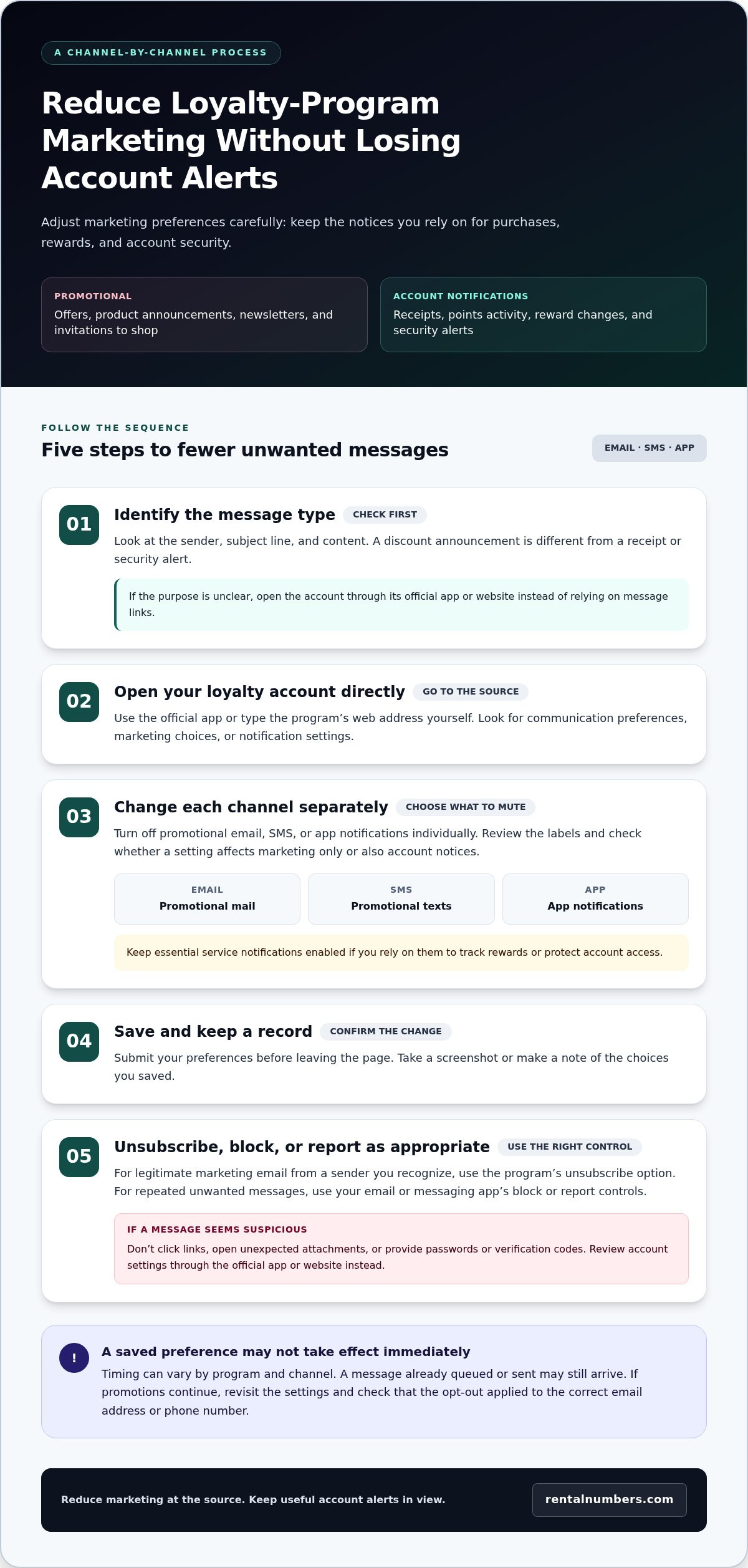
Use a channel-by-channel process. First, identify whether a message is a promotion or an account notification. Then adjust the loyalty account’s communication preferences before using an unsubscribe option. This helps reduce marketing without accidentally turning off notices about purchases, points, or account security.
- Identify the message type. Check the sender, subject, and content. A discount announcement is different from a receipt or security alert.
- Open the loyalty account directly. Use the official app or type the program’s web address yourself. Look for communication preferences, marketing choices, or notification settings.
- Change channels separately. Turn off promotional email, SMS, or app notifications individually. Keep essential service notifications enabled if you rely on them.
- Save the changes. Submit the preferences and take a screenshot or make a note for your records.
- Unsubscribe where appropriate. For marketing emails you no longer want, use the program’s unsubscribe option. Use your email or messaging app’s block or report controls for repeat unwanted messages.
How do you change email, SMS, and app preferences?
Check both the loyalty account and the settings for each channel. An account may let you opt out of promotional texts but not app alerts. Your phone’s notification settings can also silence app notifications without changing what the program sends. Review the labels carefully, disable only the categories you don’t want, and save each change before leaving the page.
Settings may take time to apply, and timing can vary by program and channel. A message already queued or sent may still arrive after you update preferences. If promotions continue, revisit the account settings and check that the opt-out applied to the correct email address or phone number.
When should you unsubscribe or report a message?
Use the unsubscribe link in a marketing email when you recognize the sender and the message appears legitimate. For a suspicious message, don’t click links, open unexpected attachments, or provide passwords or verification codes. Go to the loyalty account through its official app or website to review your settings instead.
If unwanted messages keep arriving, block the sender or report the message through your email or messaging app. This adds a separate filter at the inbox or device level. For broader contact privacy, read this virtual number privacy guide. A separate number can help keep your personal number private at sign-up, but it won’t control email promotions.
Email alias, separate inbox, or phone number: compare your options
Choose a method based on the channel you want to separate. Preference changes reduce messages at the source. An email alias or separate inbox organizes email. A separate phone number can limit exposure of your personal number at sign-up, but it won’t stop email marketing.
Channel controls change what a program sends; contact separation changes where messages go or which details you share. These methods solve different problems, and you can combine them.
| Option | Setup effort | Filtering and privacy separation | Account recovery |
|---|---|---|---|
| Program preferences | Low | Turns off selected promotional channels at the source. Doesn’t hide the contact details already on the account. | Keep essential account notices enabled. |
| Email alias | Low to moderate, depending on your email service | Separates incoming email or helps identify which address a program used. It doesn’t block messages by itself or receive SMS. | Keep access to the email account that manages the alias. |
| Separate inbox | Moderate | Routes loyalty email away from your primary inbox. Promotions still arrive in the separate inbox unless you change preferences or unsubscribe. | Store the inbox credentials securely and keep the address current in the account. |
| Separate phone number | Moderate | Separates the number entered for sign-up from your personal number. It doesn’t filter email or guarantee a program will accept it. | Ongoing access may matter if the program sends a login or recovery code later. |
Which email option works best for loyalty offers?
A dedicated inbox gives promotions a separate destination. An alias can help sort or identify messages without creating a second inbox, depending on your email service. Neither option automatically stops messages. Change the program’s marketing preferences or unsubscribe from emails you no longer want. For a cleaner setup, use an alias or dedicated inbox alongside channel-level controls. For small businesses managing multiple accounts and communication channels across a team, managed IT support from Proactive Networking Ltd offers tailored solutions to keep email systems and business networks properly organized.
When does a separate phone number make sense?
Use a separate number if you want to avoid sharing your personal number at registration. First, consider whether you might need that same number for account recovery. One-time SMS activation is designed to receive a single verification message for a specific service. A long-term number rental provides inbound SMS access during a selected rental period. Neither guarantees acceptance by a loyalty program. Review the temporary number options after weighing the access you may need later.
For how to avoid spam from loyalty programs, match the tool to the channel: adjust preferences for marketing, separate email for inbox control, and consider a separate number only when phone privacy is the concern.
A seven-step checklist for joining loyalty programs with less spam
Make contact choices before submitting a form, then verify them after the account is active. Use this checklist to decide what information to share and which messages to allow.
What should you check before submitting a sign-up form?
- 1. Review required fields. Separate details needed to create the account from optional contact information. If a phone number or secondary email is optional, decide whether you want to provide it.
- 2. Read the privacy information. Check what contact details the program collects and how it says it uses them. Look for details about marketing messages and sharing information with partners. Don’t assume every program handles preferences the same way.
- 3. Inspect each marketing choice. Look for separate email, SMS, app, or partner-marketing preferences. Notice whether any boxes are already selected, and make an active choice for each channel.
- 4. Decide which contact details to share. Consider whether the reward is worth providing each requested detail. Use an email alias or separate inbox for email separation if that suits your setup.
- 5. Choose a number with future access in mind. If you prefer not to use your personal number, consider whether you may need that number later for account verification or recovery. Read how temporary numbers work before selecting one for sign-up. One-time verification and ongoing access serve different needs.
What should you do after joining?
- 6. Save your preferences. Submit the form, confirm any verification request, and save or screenshot the settings you chose. Check the confirmation page or account profile for the email address and phone number on file.
- 7. Review the account after messages begin. If the first promotional email or text reveals a preference you missed, return to settings and adjust that channel. Keep recovery details current for accounts you want to retain, and preserve essential account alerts where possible.
Use the checklist each time you join. A few deliberate choices can reduce unnecessary contact without giving up useful account access. If a separate number fits your privacy needs, explore temporary number options and consider whether you need one-time verification or continued inbound SMS access. This is a practical way to approach how to avoid spam from loyalty programs while keeping recovery needs in view.
When a temporary number helps, and when ongoing access matters more
A separate number can keep your personal number out of a loyalty-program sign-up. It won’t stop marketing emails or control what the program sends to your inbox. Use account preferences for email promotions. Consider a separate number only if you also want to limit exposure of your phone number.
Before choosing one, ask whether the account may need SMS verification later. A number used only once can meet a one-time verification need, but it can become a recovery problem if the program later sends a login code or account alert to that number. Don’t trade privacy at sign-up for access you may need later.
Is one-time SMS verification suitable for a loyalty account?
One-time SMS activation may fit when a single verification message is the only phone-related need. It provides access to receive one verification message for a specific service, not ongoing access to future SMS. A loyalty program may also have its own number requirements, so don’t assume it will accept a temporary or virtual number.
Use this option only after considering how you’ll recover the account if you lose access or need to verify your identity again. If the program matters to you, check whether it offers another recovery method and keep that method current.
When should you consider longer-term number access?
Choose continued inbound SMS access if you expect to need future verification messages during the rental period. A long-term number rental can separate a sign-up from your personal number while providing inbound SMS access during the selected rental period. It still doesn’t guarantee that a program will accept the number, and access may not continue after that period. Plan for recovery before registering.
Review long-term number rentals if ongoing SMS access better fits your needs. For how to avoid spam from loyalty programs, match the tool to the channel and the access you need: manage email marketing through program preferences, and use a separate number only after weighing future verification and recovery.
Ready to compare number options for sign-up privacy? Explore long-term number rentals and consider whether you need one-time verification or continued inbound access.
Take control of your loyalty-program sign-ups
Start by separating promotional messages from essential account alerts. Review email, SMS, and app preferences individually, then choose contact details that fit your privacy and recovery needs. These habits make it easier to control how to avoid spam from loyalty programs without losing access to rewards accounts you value.
A separate number can add privacy at sign-up, but choose based on future access. One-time SMS activation is for receiving a single verification message. Long-term rentals provide inbound SMS access during the rental period. The dashboard lets you manage rentals, view SMS history, and track transactions.
If a separate number fits your needs, explore virtual number options and compare one-time verification with continued access. Set your preferences, protect the contact details you share, and keep the recovery methods you rely on current. You can take control one account at a time.
Frequently Asked Questions
How do I stop receiving emails from a loyalty program?
Turn off promotional email in the program’s communication preferences or use the unsubscribe option in a legitimate marketing email. Sign in through the official app or website, then check that the setting applies to the email address on your account. Keep receipts, points updates, and security alerts enabled if you rely on them. Changes may take time to apply, so review your settings again if promotions continue.
Can I unsubscribe from loyalty emails without closing my account?
Usually, you can change marketing preferences without closing the loyalty account. Look for email or marketing controls in the account settings, and disable promotions while keeping essential account notifications where possible. Unsubscribing from marketing emails may not affect receipts or security alerts, but each program handles settings differently. Check the labels before saving changes, and confirm that you can still access the account afterward.
Can I use a temporary phone number for a loyalty program?
A temporary number may let you keep your personal number separate during sign-up, but a loyalty program might not accept it. Consider future verification and account recovery first. One-time SMS activation provides a single verification message, not continuing access to future texts. A long-term number rental provides inbound SMS access during the rental period. Neither option controls promotional email or guarantees acceptance by a specific program.
How can I stop loyalty-program text messages?
Open the loyalty account’s communication settings and switch off promotional SMS while keeping important service alerts if you need them. Check the message for instructions to stop marketing texts, but only follow them if you recognize the sender and trust the message. For suspicious texts, don’t click links or share account details. Use your phone’s messaging controls to block or report repeat unwanted messages.
Will a separate email address prevent loyalty-program spam?
A separate email address won’t prevent messages from being sent, but it can keep loyalty offers out of your primary inbox. Use a dedicated inbox or an alias to organize sign-ups and identify which address receives messages. You may still need to change the program’s marketing preferences or unsubscribe. An email address also doesn’t affect SMS, so manage text preferences separately. This is one practical part of how to avoid spam from loyalty programs.
What is the difference between promotional and transactional loyalty messages?
Promotional messages encourage you to shop or engage with the program. Examples include discount offers, newsletters, and product announcements. Transactional messages relate to account activity or access, such as receipts, points changes, reward redemptions, and security alerts. Check the sender, subject, and content to identify the purpose. Turn off unwanted marketing without disabling account notifications you need to track rewards or protect access.